Embedded Build Process: 5 Signs It's Holding You Back
A new developer joins the team. They clone the repository, install the toolchain, and try to build the firmware.
It fails.
Someone sends over an environment variable. Another developer shares a library that never made it into version control. Eventually the build works and everyone moves on. The team has another engineer who can compile the project, but no one has a complete description of how it is built.
That distinction gets expensive as the team grows. A second target needs its own settings. CI uses a slightly different script. A release build depends on a machine that nobody wants to update.
These problems are easy to accept as part of embedded development. They also consume time that could be spent building and testing the product.
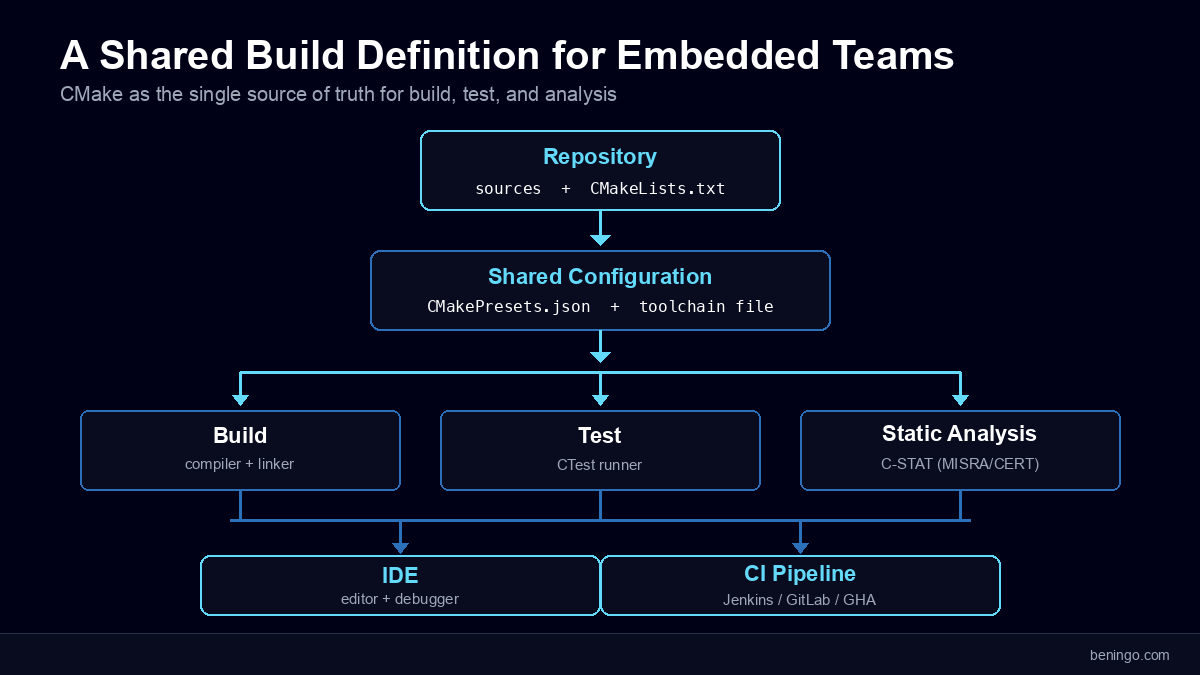
In this post, we will look at five signs that your embedded build process is holding the team back, what causes each one, and how a shared CMake-based workflow can help. You will also see how to bring building, testing, and analysis together while keeping the IDE and debugging tools your engineers already rely on. If you want to see how reproducibility fits into the bigger picture first, reproducible builds are the missing foundation for embedded CI/CD.
Sign #1: Your Build Only Works on Certain Developers’ Machines
If the first instruction for building a project is “ask someone who already has it working,” part of the embedded build process lives outside the repository.
The missing piece might be a compiler version, an SDK installed in an unexpected directory, or a generated header that someone copied manually. A successful build on one laptop hides those dependencies. A clean machine exposes them.
The immediate cost is slow onboarding. The longer-term problem appears when that laptop fails, its owner leaves, or a field issue requires the team to rebuild an older release.
Start by making the inputs explicit. Record the compiler and SDK versions, identify how dependencies are obtained, and make generated files part of the build. A new developer should be able to follow a repeatable setup rather than reconstruct someone else’s machine.
CMake toolchain files help by describing the compiler and cross-compilation settings the project uses. The project’s source files, libraries, and build requirements can then live in version-controlled CMake files rather than a developer’s private IDE configuration.
That does not install every dependency automatically. You still need to control the tools and packages around the build. It does give the team somewhere to record the decisions that would otherwise remain hidden. If you want automatic dependency installation, consider using a container.
Try a clean checkout on a machine that has never built the project. Every undocumented step needed to make it work is a dependency the team needs to capture.
Sign #2: Your CI/CD Pipeline Requires Special Workarounds
A second warning sign is a build pipeline that behaves differently from the developer’s normal workflow.
Perhaps the CI job rewrites an IDE project file before compiling. Perhaps a script copies a different linker configuration onto the build server. Or perhaps the only way to produce the firmware is to leave an interactive desktop session running.
The pipeline may pass today, but each workaround creates another place where build behavior can change. When CI fails, the developer first has to determine which version of the embedded build process actually ran.
A healthier arrangement gives the editor and CI the same build definition. The pipeline checks out the source, selects the intended configuration, invokes the command-line tools, and collects the results. Secrets, licenses, and access to hardware still need configuration, but the pipeline should not have to reconstruct the project.
IAR Build Tools, for example, provide command-line toolchains for Linux and Windows and support container-based workflows. A Linux runner can invoke the installed toolchain for the required architecture without opening a GUI. Jenkins, GitLab CI, and GitHub Actions can run those commands directly or inside a suitable Docker image.
CMake supplies the common project description. The CI service schedules the work and handles the results. Keeping those responsibilities clear makes it easier to reproduce a CI failure locally, which is one of the motivations behind reproducible embedded CI/CD builds.
Ask a developer to run the pipeline’s build command from a clean terminal. If they need to translate it into a different set of IDE settings, the two workflows still have room to drift.
Sign #3: Adding a New Target Means Cloning and Modifying Projects
Copying an existing project is a quick way to support a second board. The maintenance cost arrives later.
A shared library changes. A warning needs to be enabled. A compiler option needs correcting. Now someone has to remember which copies need the same update and which differences are intentional.
After several products and board revisions, a small change can turn into a search through nearly identical project files.
CMake organizes a build around targets, such as libraries and executables, and their dependencies. A reusable module can carry its own include directories and other requirements. Projects that use the module inherit the requirements intended for its consumers instead of copying them by hand.
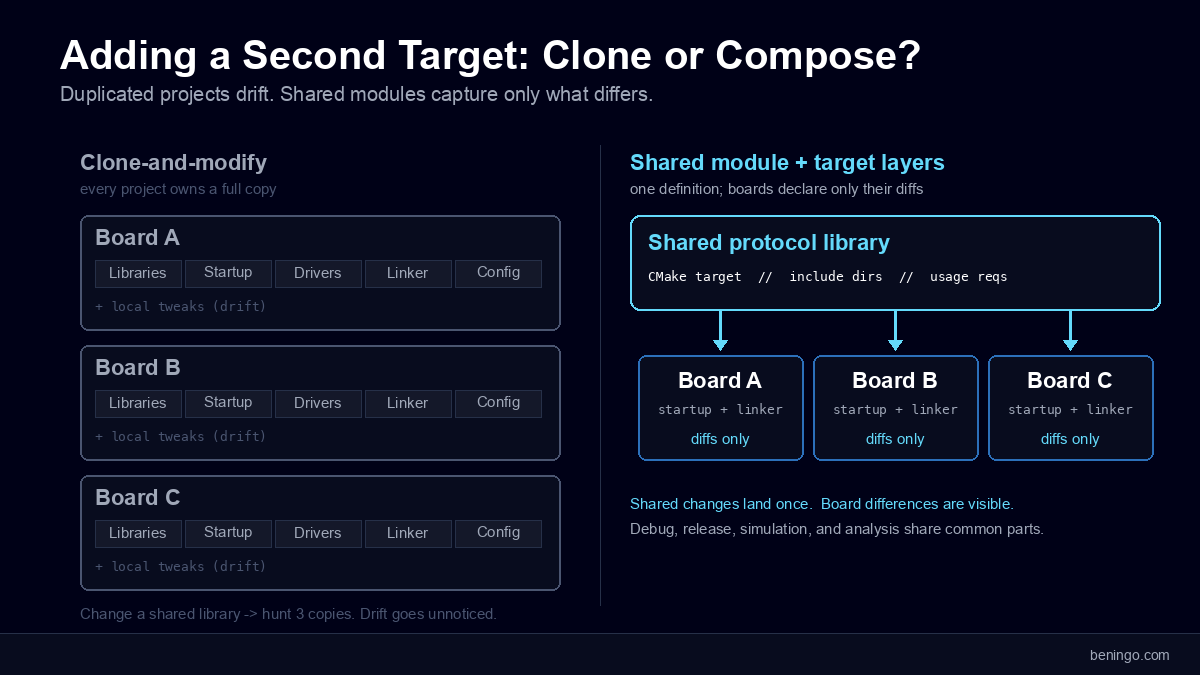
For example, two boards might share a protocol library while using different startup code, device drivers, and linker scripts. Keep the common library definition together and make the board-specific inputs explicit. Adding the next board then means describing what is different, rather than creating another independent copy of everything.
Separate build directories also let you keep configurations apart. A firmware build for an Arm target and a host-based unit test can reuse application code while selecting different compilers and platform support. Debug, release, simulation, and analysis configurations can share the parts that are genuinely common.
CMake does not remove the need to port hardware-dependent code. It makes those dependencies easier to identify and manage. That is the distinction to look for: can you add a target by expressing its differences, or do you have to duplicate the whole project? For a broader look at how build configurations are structured, see Mastering Embedded Build Systems: Exploring the 5 Essential Configurations.
Sign #4: Build Settings Drift Between Teams and Environments
Configuration drift is harder to spot than a failed build because both versions may compile successfully.
One team enables a warning that another suppresses. CI builds with different optimization settings. A developer tests with a preprocessor definition that never reaches the release configuration. The source revision matches, but the assumptions behind the resulting firmware do not.
CMake presets provide named configurations that a team can share. Project-wide settings belong in CMakePresets.json under version control. Machine-specific details can stay in CMakeUserPresets.json, which is intended for local use rather than sharing.
The useful change is that “build the release configuration” becomes a specific, reviewable selection. Developers and CI can select the same preset instead of assembling an equivalent set of options from memory.
Review configuration changes alongside source changes. Pin toolchain versions and dependencies, and retain the build configuration with the release. Shared CMake files control the instructions; a controlled environment supplies the tools that execute them. You need both when reproducibility matters.
There will still be valid differences between builds. A debug build and an optimized release serve different purposes. The goal is to make those differences deliberate and visible, so the team knows which configuration was tested and which one shipped.
Sign #5: Developers Spend More Time Fixing the Build Than Improving the Product
The final warning sign is the cumulative effect of the first four.
Developers lose part of the morning to a broken configuration. The person who understands the CI scripts gets interrupted again. A test stops running after a directory change, and static analysis is postponed because nobody has time to repair its separate setup.
You do not need to wait until embedded build process maintenance consumes most of the week to act. Repeated interruptions are already a cost. Track the time spent fixing environments, synchronizing project settings, and investigating build-only failures. That gives you a baseline for deciding whether a workflow change is helping. For a more complete view of what a maintained pipeline looks like end to end, see Developing an Embedded Software Build Pipeline.
Building, testing, and analysis should also share the project information they depend on. Otherwise each activity needs its own copy of the source list, compiler settings, and paths.
CTest provides test integration within a CMake-based project. The test definition identifies what command runs the test; an embedded executable still needs an appropriate simulator or hardware connection.
IAR’s CMake tutorial demonstrates this with a test command that launches the C-SPY batch debugger against an Arm simulator. It uses CTest’s PASS_REGULAR_EXPRESSION property to recognize expected output. That property ignores the ordinary process exit code, so a real test wrapper needs deliberate failure handling and timeouts. A passing message should indicate that the intended checks actually completed.
Static analysis can use the same configuration approach. Zephyr’s C-STAT integration selects the analyzer through ZEPHYR_SCA_VARIANT=iar_c_stat in the west build command. CMake variables such as CSTAT_RULESET control the analysis rules. The documented integration requires CMake 4.1 or later.
IAR C-STAT supports checks associated with MISRA C/C++, CERT C/C++, and CWE weakness categories. With the analysis configuration kept alongside the build, the team can review it and use it consistently in automated runs.
The compiler, test runner, and analyzer remain separate tools. CMake gives them a shared project context, reducing the configuration work needed to keep them aligned.
Keep the IDE, Change Where the Build Is Defined
Moving toward CMake does not require the team to give up an integrated development environment. It does require the IDE to work with the shared project definition.
The IAR cross-platform IDE’s CMake workflow opens CMake projects without converting the build into a proprietary project format. IAR also describes attaching the IDE to an existing, pre-configured Zephyr project while retaining the west workflow.
That lets a team use the IDE for editing and hardware debugging while command-line tools and CI use the same CMake description. Compiler optimization and analysis remain available through the configured toolchain. The project does not need a second build definition simply because a developer wants integrated debugging.
The benefit is especially useful during migration. You can introduce a CMake-based project where it solves a current problem while leaving established products on a controlled, working configuration. There is no need to convert every maintained release at once.
Next Steps
Pick the warning sign that costs your team the most time, then choose one active project on which to address it.
Establish a clean command-line build. Capture shared configurations, connect the build to CI, and add a representative test and analysis run. Check that developers can still use the debugger and target hardware they need. Measure whether onboarding, configuration changes, and build troubleshooting become easier.
If you want a starting point for an IAR-based project, its CMake tutorial provides a concrete example to adapt.
The real test is what happens after the first successful build. Can another developer reproduce it? Can the pipeline run it? Can the team add a board or change a shared library without repairing several copies of the configuration?
When those tasks become routine, your embedded build process starts giving engineering time back to the product.
Want embedded engineering insights like this delivered to your inbox? Sign up for my Embedded Bytes newsletter to get the latest posts, insights, and hands-on tips delivered straight to your inbox.
Frequently Asked Questions
What are the signs that an embedded build process needs improvement?
Five warning signs are builds that work only on certain machines, special CI workarounds, copied projects for each new target, configuration drift, and repeated build troubleshooting. These problems make onboarding, releases, and maintenance harder because the team cannot reliably share and reproduce its embedded build process.
How does CMake help teams share an embedded firmware build?
CMake records sources, dependencies, and build settings in files the team can version and review. A CMake toolchain file identifies the compiler and cross-compilation settings. Developers and CI can use the same project definition, reducing the need to maintain separate IDE and pipeline configurations.
Does using CMake guarantee reproducible firmware builds?
No. A shared CMake definition captures build instructions, but reproducibility also depends on controlling the source revision, compiler, SDK, dependencies, generated files, and environment. Retain those inputs with each release and test rebuilding on a clean machine. A successful build on the original developer’s laptop is only a starting point.
How can developers and CI use consistent build settings?
Keep shared configurations in CMakePresets.json under version control, and have developers and CI select the same intended preset. Keep local settings in CMakeUserPresets.json, which should stay out of version control. The CMake presets manual explains the distinction. Matching presets still require compatible tools and dependencies.
Can CTest run tests for embedded firmware?
CTest runs test commands defined by the project. An embedded test needs a suitable execution environment, such as a simulator or connected target hardware; CTest does not provide that environment itself. IAR’s CMake tutorial demonstrates simulator testing through the C-SPY batch debugger. Configure failure detection and timeouts so incomplete tests cannot appear successful.
What is a practical first step toward improving an embedded build process?
Choose one active project and try building it from a clean checkout on another machine. Capture every undocumented dependency and manual step, then establish a command-line build that CI can also run. Add a representative test and analysis run, and measure whether onboarding and build troubleshooting take less time.
Struggling to keep your development skills up to date or facing outdated processes that slow down your team, raise costs, and impact product quality?
Here are 4 ways I can help you:
- Embedded Software Academy: Enhance your skills, streamline your processes, and elevate your architecture. Join my academy for on-demand, hands-on workshops and cutting-edge development resources designed to transform your career and keep you ahead of the curve.
- Consulting Services: Get personalized, expert guidance to streamline your development processes, boost efficiency, and achieve your project goals faster. Partner with us to unlock your team's full potential and drive innovation, ensuring your projects success.
- Team Training and Development: Empower your team with the latest best practices in embedded software. Our expert-led training sessions will equip your team with the skills and knowledge to excel, innovate, and drive your projects to success.
- Customized Design Solutions: Get design and development assistance to enhance efficiency, ensure robust testing, and streamline your development pipeline, driving your projects success.
Take action today to upgrade your skills, optimize your team, and achieve success.