
3 Tips for Repurposing Development Boards for Testing
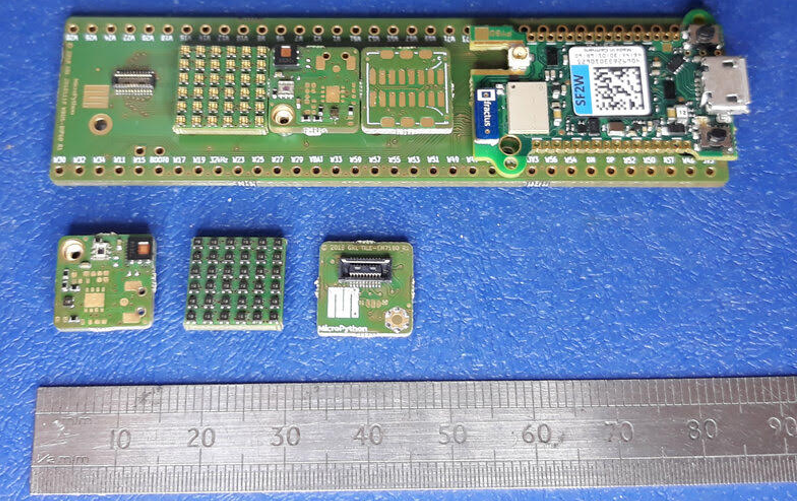
Unfortunately, my embedded software development co-pilot (An original Saleae Logic probe that I’ve had for a decade) bit the dust the other night. I was working late and accidentally connected one of the channels to a 12-volt signal when the analyzer was designed for 5V with 10V overvoltage protection. (Yes, that means another article on how to protect your test equipment is coming soon). With work still to be done and 24 – 48 hours before I would receive my new analyzer, I had to improvise to keep my debug session going which led me to repurpose a MicroPython original Pyboard for the task. Let’s look at a few tips for repurposing development boards for test equipment.
Tip #1 – Use a Development Board that Supports Python
Nearly any development board can be used to acquire data. Onboard microcontrollers have useful peripheral interfaces such as analog to digital converters, GPIO and a wide range of communication peripherals. This can lend itself well to customizing a test setup that might not be available in off-the-shelf test equipment. An important factor though is that if a development board is leveraged for use as test equipment, it should be easy to program. I personally find that leveraging Python makes writing test scripts much easier so selecting a development board that supports MicroPython or Circuit Python is highly recommended. These development boards already have the low-level hardware supported so it’s easy to get something up and running in less than 10 minutes.
Tip #2 – Use Python print Statements to Transfer Data
There are certainly different techniques that can be used to transfer data between the development board and a PC to acquire data. When I had to leverage my makeshift logic analyzer, I wrote a super simple routine that used the development boards USB connection to transfer print statements back to the PC. I was simply trying to measure that timing was correct on one output channel over an extended period of time. For this, I was able to simply record the current system time and then calculate the different between them. The routine looks something like the following:
while True:
NewState = pin_x2.value()
if NewState != State:
State = NewState
myTime = time.tick_ms()
print(myTime)
pyb.LED(LED_GREEN).toggle()
On a single channel, the code is just looking for the logic on the pin to change and then it records the time. The reader can see the use of the print statement and that for visual confirmation and LED is toggled. There is a ton though that can be used with this technique across multiple channels without much effort at all.
Tip #3 – Capture Data in a Terminal
It is common practice to actually record the incoming data somewhere and the most natural place is to use a terminal. Using Linux or a Mac terminal, it’s easy to open the communication port and just redirect the incoming contents to a file for processing later. However, on Windows there isn’t really a terminal that is built in that can do this. However, there are several options available to developers.
First, developers can use the capture feature in a tool like Realterm. This terminal software will redirect the incoming data on a port to a file. Second, developers could write a simple Python script that reads incoming data using PySerial and then writes the data to a file. This could be executed directly from the command line and if needed or customized for the data. A Python script approach does allow for cross platform use but if a developer is in a hurry, just using Realterm is less work and provides good results.
Conclusions
Development boards can serve a second purpose to developers that allows them to repurpose the board for use as test equipment. This can provide additional flexibility for testing an embedded system and allows the data that is received to be customized so that it is easier to process. While nothing can really replace my favorite analyzer (which is now on my bench and taking its rightful place), I still leverage development boards for custom measurement capabilities that otherwise I may not be able to find in expensive, off-the-shelf software or even not at all. This can come in particularly handy when there is some custom test that needs to be performed or when the data is needed in a specific format.
Struggling to keep your development skills up to date or facing outdated processes that slow down your team, raise costs, and impact product quality?
Here are 4 ways I can help you:
- Embedded Software Academy: Enhance your skills, streamline your processes, and elevate your architecture. Join my academy for on-demand, hands-on workshops and cutting-edge development resources designed to transform your career and keep you ahead of the curve.
- Consulting Services: Get personalized, expert guidance to streamline your development processes, boost efficiency, and achieve your project goals faster. Partner with us to unlock your team's full potential and drive innovation, ensuring your projects success.
- Team Training and Development: Empower your team with the latest best practices in embedded software. Our expert-led training sessions will equip your team with the skills and knowledge to excel, innovate, and drive your projects to success.
- Customized Design Solutions: Get design and development assistance to enhance efficiency, ensure robust testing, and streamline your development pipeline, driving your projects success.
Take action today to upgrade your skills, optimize your team, and achieve success.
My personal Saleae Logic has the scars from when I hooked up the ground connection to the 24V power loop on a board. The test-lead melted a little and I lost the use of that USB port, but the the Logic unit still functions. We moved the 24V loop away from the GND loop on the next rev of the board.