
Simplify Embedded Serial Communication with Protobuf
Every firmware developer has done it. You need to send a sensor reading from your microcontroller (MCU) to a host over a serial line, so you reach for a byte buffer and start packing. This is the everyday embedded serial communication Protobuf problem, before you know it has a name.
buf[0] = msg_id;
buf[1] = temp >> 8;
buf[2] = temp & 0xFF;and so on. It works on the bench the first time you flash it, so it ships.
Then the trouble starts. Six months later, you add a field, and now you’re editing pack code on the device and unpack code on the host, keeping two hand-written parsers in sync by memory. An endianness mismatch corrupts a reading. A struct you cast straight onto the wire picks up padding bytes on one compiler and not another. Your protocol spec, such as it is, lives in two diverging .c files that no longer agree. That is exactly the kind of long-term structural drift good firmware architecture strategies are supposed to prevent.
This is where embedded serial communication Protobuf enters the picture. Protocol Buffers give you a schema-driven way to define your messages once, generate the pack and unpack code for both ends. Protobuf solves one specific piece of this puzzle, and if you don’t know which piece, your first attempt will fall apart the moment two messages arrive back-to-back over your UART (the serial peripheral moving the bytes).
In this post, I’ll show you exactly what embedded serial communication Protobuf really requires, what Protobuf does and doesn’t do for a serial link, how to run it on a resource-constrained MCU with nanopb, and how to add the framing and integrity layers Protobuf deliberately leaves to you. Let’s dig in.
What Embedded Serial Communication Protobuf Is, and What It Isn’t
Protocol Buffers can be confusing if it’s your first time hearing about them. You might think it covers everything you need for two devices to communicate over a serial interface. It’s not. Protocol Buffers, or Protobuf, are three things bundled together.
First, Protobuf is a serialization format, meaning a compact binary representation of structured data over the wire.
Second, it’s an interface definition language (IDL) defined by a .proto schema file in which you declare your messages.
Third, it’s a toolchain. Protobuf uses the protoc compiler plus a code generator that emits encode and decode functions in your target language. (Yes, more than just C or C++!)
Here’s the part that trips people up. Protobuf is not a transport protocol. It defines the payload, the meaning of your bytes, and nothing else. It does not tell the receiver where one message ends and the next begins. It does not move bytes across a wire. It does not detect corruption. Those are separate jobs outside the purview of Protobuf. If you assume Protobuf handles them, your embedded serial communication Protobuf link works with one message on the bench and breaks the instant real traffic shows up.
The cleanest way to hold this in your head is as a stack of four layers, each with one job.
- Payload is Protobuf. It answers “what does this data mean?”
- Framing is length-prefix or COBS. It answers “where does a message start and stop?”
- Transport is your UART, RS-485, or USB CDC. It answers “how do the bytes physically move?”
- Integrity is a CRC. It answers “did the bytes arrive intact?”
Protobuf owns the top layer of embedded serial communication Protobuf, and only that layer. The other three are your responsibility. Naive implementations of embedded serial communication Protobuf fail because they treat a payload format as if it were the whole stack.
It helps to see how those layers actually sit on the wire, because they don’t stack vertically so much as wrap around each other in sequence.
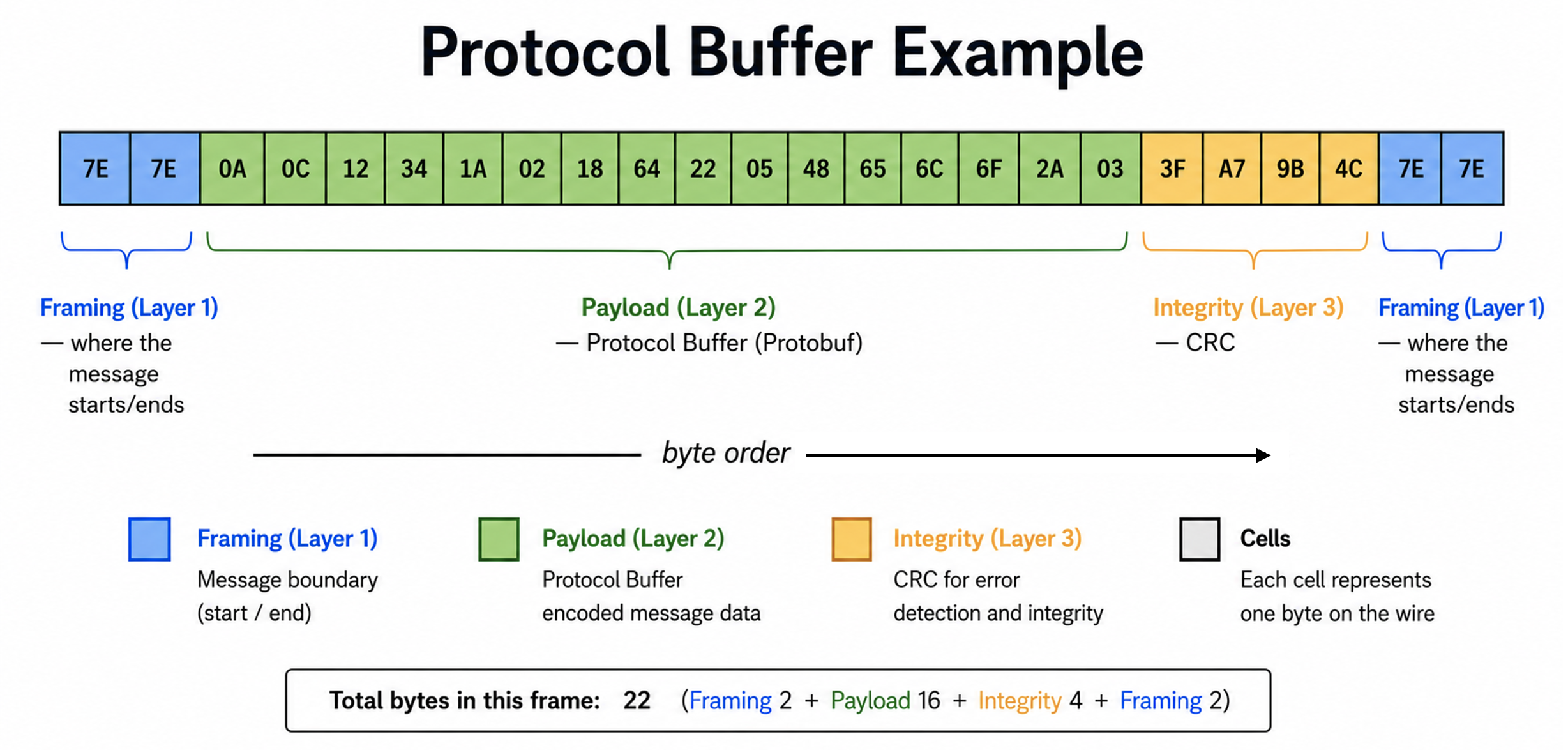
Get this model straight now and the rest of this post is really just filling in each layer.
Why Embedded Serial Communication Protobuf Fits Firmware
Protobuf handles the payload layer of embedded serial communication Protobuf. The question is why it handles it better than the hand-packed buffer you’d otherwise write. There are three reasons that matter for firmware.
Reason #1: The Schema Is the Single Source of Truth for Embedded Serial Communication Protobuf
Protobuf uses a .proto file that becomes your documented interface. It’s not a comment describing the protocol, it is the protocol, and both ends generate their code from it. Here’s a small one for a weather sample message.
syntax = "proto3";

message WeatherSample {
  uint32 seq          = 1;
  float  temperature  = 2;
  uint32 humidity_pct = 3;
  uint32 battery_mv   = 4;
}If you haven’t seen a .proto file before, here’s how to read it.
The syntax line declares which version of the language you’re using, and proto3 is the current one you want for new work. Each line inside the message declares one field, with a type, a name, and a number. The types are what you’d expect: uint32 for the sequence counter and readings, float for the temperature. The names are yours to choose.
The part that surprises most C programmers is the number after the equals sign. That is not a value and it is not an array index. It is the field’s tag, a permanent ID that identifies the field on the wire. seq is field 1 forever, whatever you rename it to. Those tags are how both ends agree on which bytes mean what, and they’re doing more work than they look like, which is the next reason.
That file is the whole agreement between device and host. When the schema changes, both ends regenerate. There’s no second parser to update by hand, and no chance of the device and host drifting out of sync, because neither one has a hand-written parser to drift.
Reason #2: The Binary Encoding is Compact
Protobuf doesn’t send your field names over the wire, which is a big part of why embedded serial communication Protobuf runs so lean. Instead it leans on a technique called a varint, short for variable-length integer, and it’s worth understanding because it’s where the space savings come from. A varint stores a number in as few bytes as possible. It uses the top bit of each byte as a continuation flag: if that bit is set, another byte follows, and if it’s clear, the number ends there. The practical result is that small numbers cost a single byte, and only large ones spill into two or more. A value like 65 fits in one byte, where a fixed 32-bit integer would always burn four.
Each field on the wire is then written as a key followed by its value. The key is itself a varint that packs two things together, the field number and the wire type (which tells the decoder whether the value is a varint, a fixed-width number, or a length-delimited chunk), using (field_number << 3) | wire_type. Because that key is a varint too, keeping your field numbers small keeps your keys one byte. That has a direct consequence worth internalizing.
Field numbers 1 through 15 produce a one-byte key, while 16 through 2047 need two bytes. Assign your frequent fields the low numbers. In the WeatherSample message above, that’s why seq, temperature, and the rest got 1, 2, 3, and 4 rather than arbitrary values.
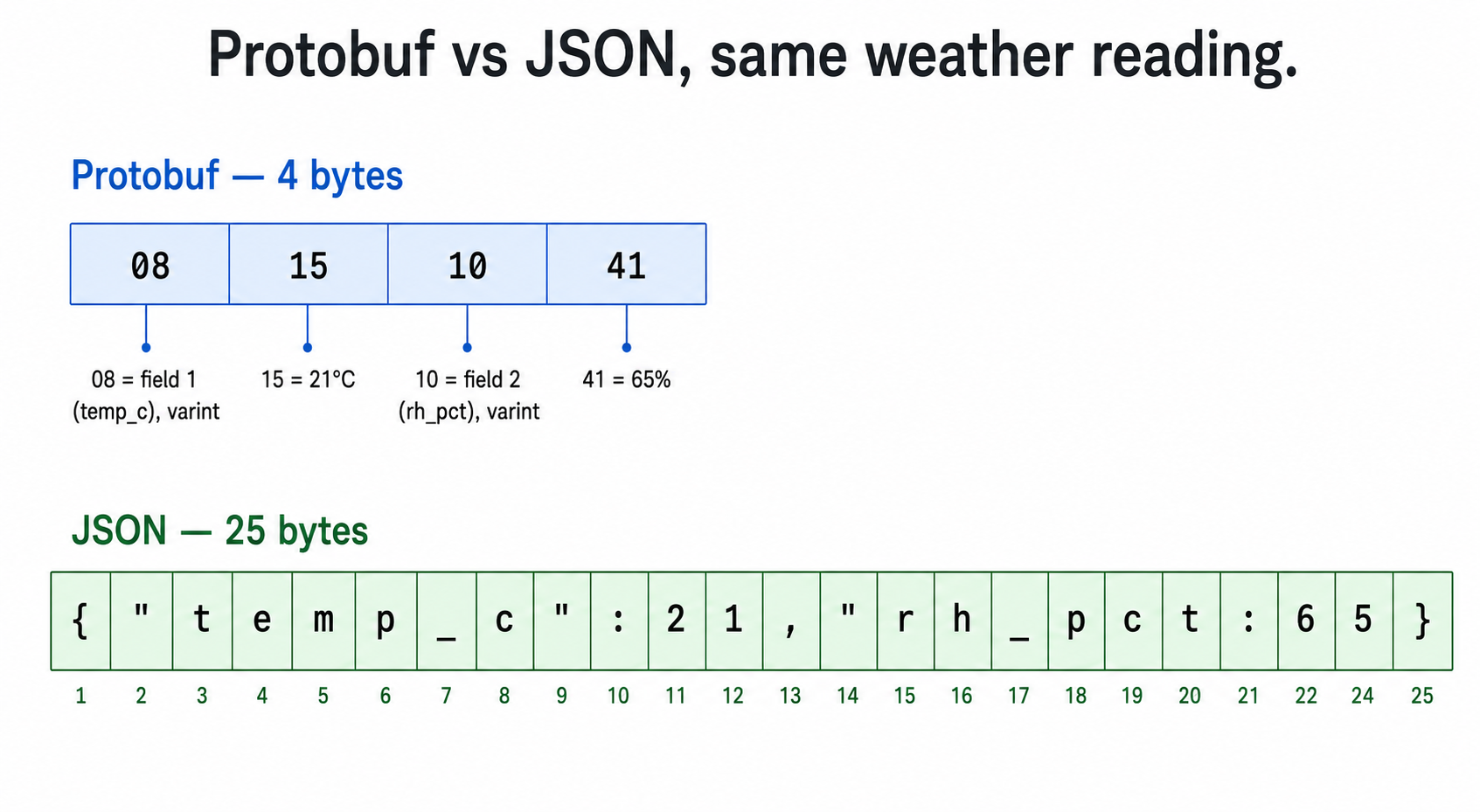
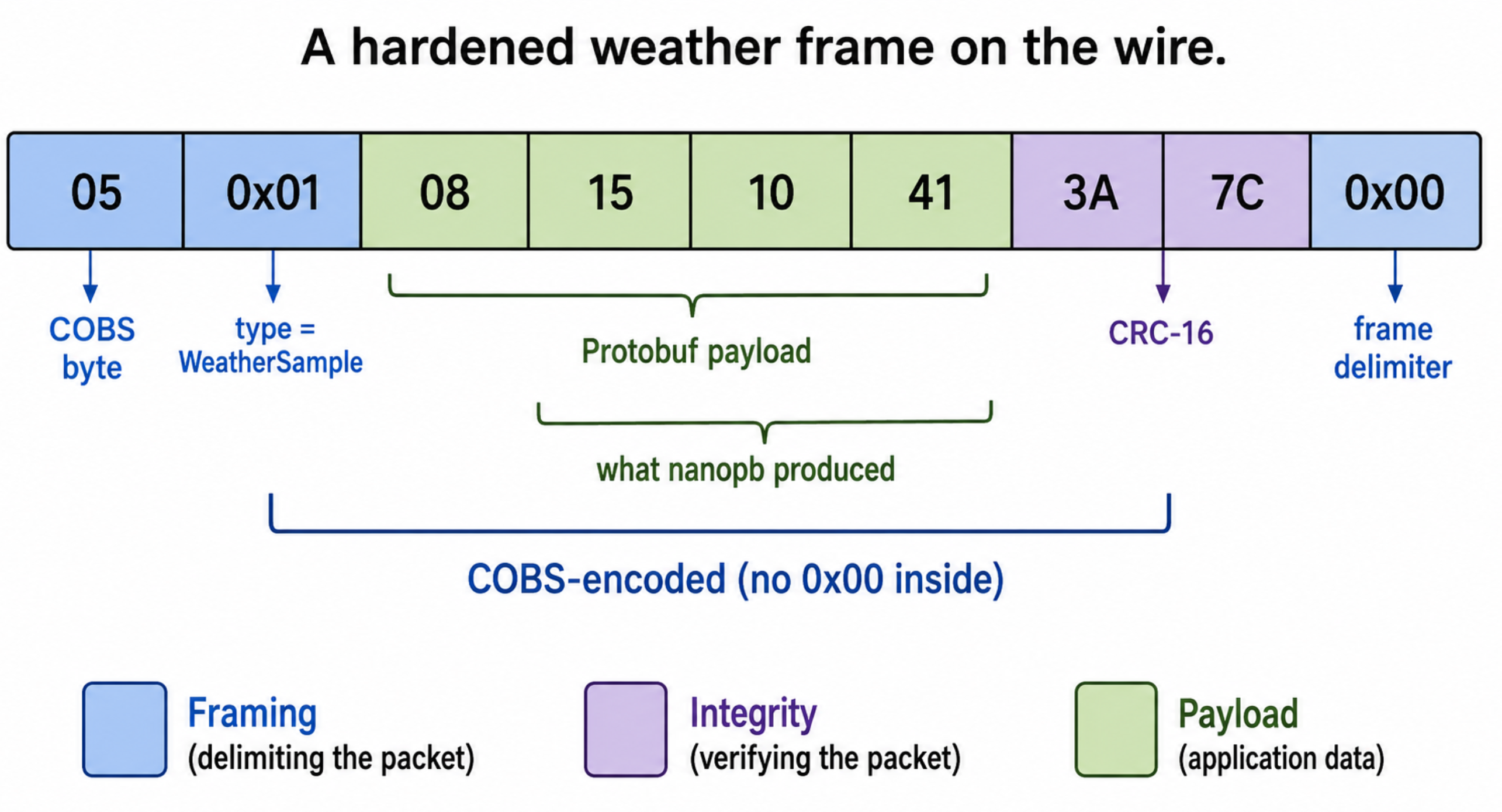
How compact is it in practice? Take a stripped-down weather reading with a temperature of 21°C and 65% relative humidity. Encoded as Protobuf, the whole thing is four bytes: 08 15 10 41. The same data as JSON, {"temp_c":21,"rh_pct":65}, runs 25 bytes. That’s the difference between a payload format built for the wire and one built for a text editor, and the gap only widens as messages grow.
Reason #3: The Schema Can Evolve Without Breaking the Field
This is the win that pays off years later. The wire format carries field numbers, not names, and that single design choice gives you a real versioning story. You can rename a field in the .proto and nothing on the wire changes. You can add a new field, and an old decoder that doesn’t know about it simply ignores it. A new decoder reading old data just sees the field as absent.
There are two rules you don’t break.
- Never reuse a field number, because an old device will interpret the new field as the old one and silently corrupt the reading. When you remove a field, mark its number
reservedso nobody reuses it by accident. - Never change a field’s type, because that changes how the bytes are interpreted. When you need a different type, deprecate the old field and add a new one with a new number.
message WeatherSample {
  reserved 5;              // retired field, never reuse this number

  uint32 seq           = 1;
  float  temperature   = 2;
  uint32 humidity_pct  = 3;
  uint32 battery_mv    = 4;
  uint32 pressure_hpa  = 6; // added later; old decoders ignore it
}An old device and a new host can talk to each other across this change without either one misreading a byte. Try getting that from two hand-maintained pack/unpack protocols.
But Why Not Just Pack a Binary Struct?
It’s a fair objection when you first hear about embedded serial communication Protobuf, and if you’re an embedded developer your instinct is probably to skip all this and memcpy a packed struct straight onto the wire. That works, and it might even be a byte or two smaller than Protobuf, since Protobuf spends a byte on each field’s key. If raw size on a tight link were the only thing that mattered, hand-rolled binary could win.
But size was never the real problem. Casting a struct onto the wire is the exact thing that breaks across compilers, because struct padding and alignment aren’t guaranteed, and it breaks across architectures the moment endianness differs between your MCU and the host. And it throws away everything in the section you just read: the schema as a shared contract, and the field evolution that lets an old device and a new host still understand each other.
Add a field to a packed struct and every old device misreads every byte after the change. Protobuf trades a few bytes per message for layout that doesn’t depend on your compiler and a protocol you can evolve without breaking the devices already in the field. On a link you’ll maintain for years, that trade pays for itself. On a two-field message that will never change and where every byte is scarce, hand-rolled binary might still be the best choice, and that’s fine.
nanopb: Protobuf Sized for a Microcontroller
If you go download Protobuf and try to drop it onto an MCU, you’ll hit a wall fast. Google’s reference implementation targets servers and desktops. Even the stripped-down protobuf-lite runtime runs into the hundreds of kilobytes before you’ve added a single message of your own. That’s a non-starter on a part with tens of kilobytes of flash.
This is what nanopb is for. It’s the ANSI C implementation that makes embedded serial communication Protobuf viable on tight silicon of Protocol Buffers, built for exactly this problem. The official project targets 32-bit microcontrollers and fits systems with under 10 kB of ROM and under 1 kB of RAM. The entire runtime you add to your firmware is three C files: pb_encode.c, pb_decode.c, and pb_common.c, plus their headers. That’s it.
The Workflow
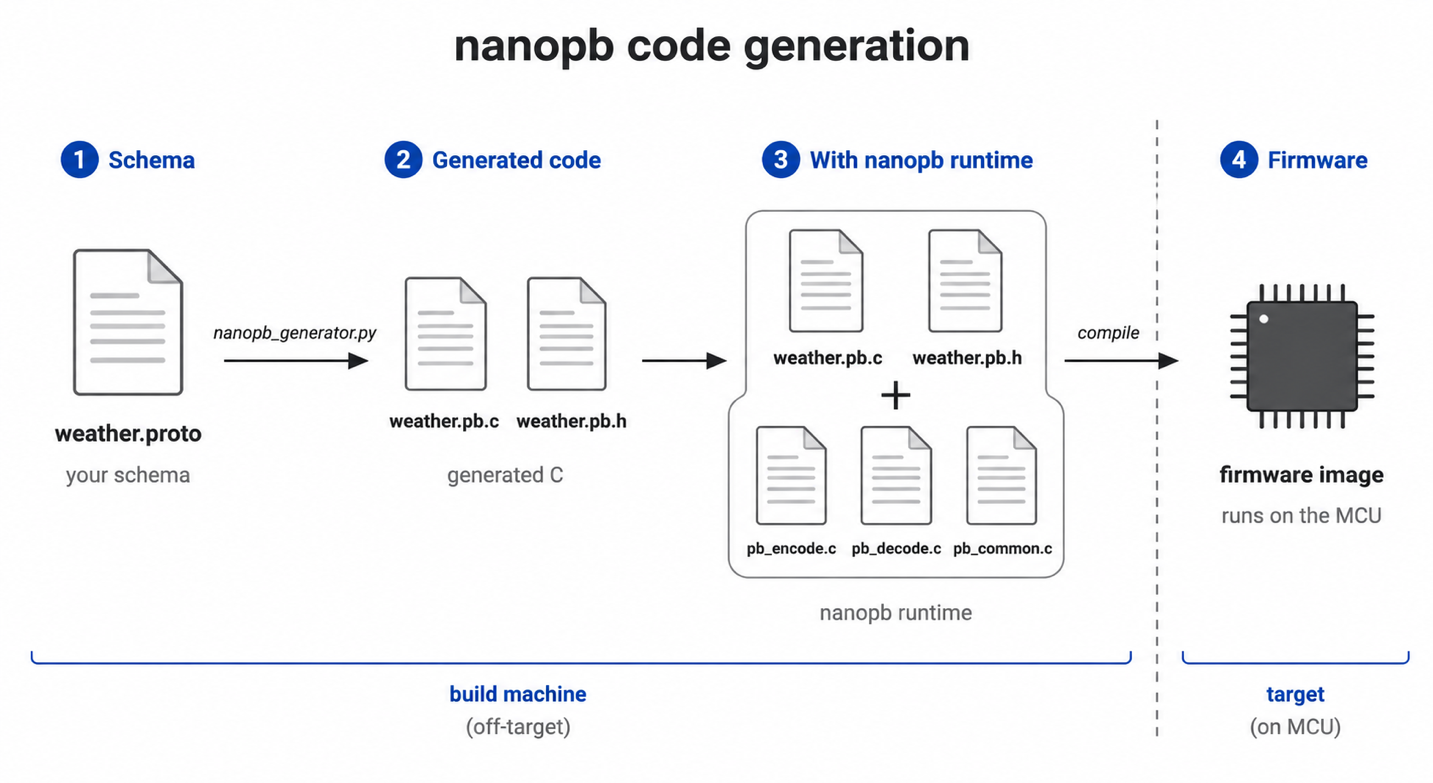
The code generation runs on your build machine, not the target. You write the schema, run the generator, and compile the output with your firmware.
First, write your .proto file, the WeatherSample schema from above. Next, run the nanopb generator against it.
python nanopb_generator.py weather.protoThat produces weather.pb.c and weather.pb.h. Under the hood the generator is a protoc plugin, so you’ll need the Protobuf toolchain available, which is a quick install:
pip install --upgrade protobuf grpcio-toolsFinally, you #include "weather.pb.h" in your firmware and compile weather.pb.c alongside the three nanopb runtime files. Nothing generated ever runs on your build host beyond code generation, and nothing on the target was written by hand.
Static Allocation is Non-Negotiable
Here’s the detail that separates embedded serial communication Protobuf from the desktop version. By default, variable-length fields, meaning string, bytes, and repeated fields, are handled with callbacks or dynamic allocation. On a heap-less MCU, that’s exactly what you don’t want.
The fix is an .options file that lives beside your .proto and pins the sizes, so nanopb generates plain fixed-size struct fields with no heap in sight. Say you add a station name and an array of recent samples to the schema.
# weather.options
WeatherSample.name    max_size:16
WeatherSample.recent max_count:10max_size sets the byte count for a string or bytes field, and it includes the null terminator for strings. max_count fixes the number of elements in a repeated field. Keeping these in a separate .options file rather than inline in the .proto matters for a reason worth stating: it keeps the .proto itself portable, so the same schema still generates clean code with other Protobuf libraries on the host side. That portability is the whole point, and inline nanopb annotations quietly throw it away.
Encode and Decode
This is where the benefits of embedded serial communication Protobuf really pay off. Encoding is a buffer, a message struct, and one call. Check out the example below:
uint8_t buf[64];
WeatherSample msg = WeatherSample_init_zero;

msg.seq          = 42;
msg.temperature  = 23.5f;
msg.humidity_pct = 65;
msg.battery_mv   = 3700;

pb_ostream_t ostream = pb_ostream_from_buffer(buf, sizeof(buf));

if (!pb_encode(&ostream, WeatherSample_fields, &msg)) {
    // encode failed; inspect PB_GET_ERROR(&ostream)
    return;
}

size_t len = ostream.bytes_written;
uart_send(buf, len); // transport layer, a separate concernDecoding is the mirror image.
WeatherSample in = WeatherSample_init_zero;
pb_istream_t istream = pb_istream_from_buffer(rxbuf, rxlen);

if (!pb_decode(&istream, WeatherSample_fields, &in)) {
    // decode failed; the struct contents are not trustworthy
    return;
}

// in.temperature, in.humidity_pct, etc. are now safe to useTwo things deserve your attention here.
First, always check the return value of pb_encode and pb_decode. If decode returns false, you cannot trust a single field in the struct, and treating a failed decode as usable data is a classic way to ship a bug that only shows up under line noise.
Second, notice the uart_send call sitting outside the encode logic. That’s deliberate. nanopb handed us a buffer and a length and stopped there. That is precisely the boundary of what embedded serial communication Protobuf gives you. It has no opinion about how those bytes reach the other end, and it certainly hasn’t told the receiver where this message stops and the next one begins. That’s the next problem to solve.
The Part Embedded Serial Communication Protobuf Doesn’t Do: Framing and Integrity
Here’s the trap. Your encode call handed you a buffer and a length. You send those bytes over the UART, they arrive on the other side, you decode them, and it works. You send one message, it works. You conclude you’re done.
Then two messages arrive back to back, and the receiver has no idea where the first one ends. Or a byte drops on a noisy line, and every message after it is garbage because the receiver is now reading from the wrong offset. Protobuf gave you N bytes with no boundaries, and a UART is just a stream of bytes with no inherent notion of a message. Something has to draw the lines. That something is framing, and it’s your job.
Framing with a Length Prefix
The simplest approach to framing embedded serial communication Protobuf is to prepend the message length. The receiver reads the length, then reads exactly that many bytes. nanopb supports this directly through the extended encode and decode calls.
pb_ostream_t ostream = pb_ostream_from_buffer(buf, sizeof(buf));
pb_encode_ex(&ostream, WeatherSample_fields, &msg, PB_ENCODE_DELIMITED);PB_ENCODE_DELIMITED writes a varint length in front of the message, and PB_DECODE_DELIMITED on the receiving side reads it back. It’s low overhead and easy to reason about. The weakness shows up under noise. If a length byte gets corrupted, the receiver reads the wrong number of bytes and desyncs, and it stays desynced until it happens to guess a frame boundary correctly. Recovery is a matter of luck.
Framing with COBS
For a link where you actually expect noise, Consistent Overhead Byte Stuffing (COBS) is the stronger choice. The idea is clever. COBS transforms the payload so that the byte value 0x00 never appears inside it, which frees 0x00 to serve as an unambiguous frame delimiter. The cost is fixed and tiny, one byte of overhead for every 254 bytes of payload, plus the single delimiter byte.
The payoff is guaranteed resynchronization. After any corrupted frame, the very next 0x00 cleanly marks the start of a fresh frame. There’s no guessing and no drift. Drop a byte, lose one frame, and you’re back in sync at the next delimiter. This is why COBS shows up in real embedded stacks, including the Rust postcard protocol, Espressif’s ESP-IDF, and Cyphal’s serial transport. It’s a proven pattern, not a clever trick from a blog post.
Integrity with a CRC
One more thing neither Protobuf nor framing gives you: error detection. COBS tells you where a frame is. It does not tell you whether the bytes inside it are correct. A bit flip on the wire produces a perfectly well-framed message full of wrong data, and both length-prefix and COBS will hand it to your decoder without complaint.
Integrity is a separate, deliberate layer. Compute a CRC over the encoded payload, append it before framing, and verify it on the receiving side before trusting the decoded data. A CRC-16 is inexpensive and catches most real-world bit errors. It is easy to skip this layer when everything works on the bench, where there is no noise, but teams often regret that choice after the hardware ships and operates near a switching power supply.
Dispatching More Than One Message Type
A real device sends more than one kind of message. You’ve got a WeatherSample, maybe a Command, maybe a StatusReply. The decoder needs to know which one it’s looking at before it can pick the right _fields descriptor. Two clean ways to handle it. You can wrap everything in a top-level oneof message and let Protobuf discriminate, or you can prepend a single message-type byte ahead of the payload and dispatch on it. The type byte is simple and explicit, and it slots naturally into the frame layout we’re about to assemble.
Put plainly, here’s what you still own after Protobuf handles the payload: framing so messages have boundaries, a CRC so you can trust the contents, and a type byte so you know what you’re decoding. Protobuf did real work for you. It just didn’t do all of it, and pretending otherwise is how the naive version of embedded serial communication Protobuf breaks.
Putting the Embedded Serial Communication Protobuf Stack Together
Now stack the layers into a single frame. Start with the Protobuf payload, prepend a message-type byte so the receiver knows what it’s decoding, append a CRC-16 so it can trust the contents, then run the whole thing through COBS and cap it with a 0x00 delimiter. Conceptually:
0x00-free( [type][protobuf payload][CRC16] ) 0x00Read from the outside in, that’s exactly the four-layer model from the top of this post, now expressed as real bytes in wire order. The 0x00 delimiter and COBS encoding are the framing layer. The CRC is integrity. The type byte routes to the right decoder. The Protobuf payload in the middle is the only part nanopb produced. Every layer is visible, and every layer has one job.
The Cross-Language Payoff
Here’s the part that makes this more than a tidier byte format. That .proto file, the heart of embedded serial communication Protobuf, is shared. The same schema that generates C for your MCU generates Python for your bench. Your host-side test tool, the thing you use to poke the device during bring-up, becomes a few lines instead of a hand-written parser you have to keep in sync by hand.
import weather_pb2  # generated from the same weather.proto

sample = weather_pb2.WeatherSample()
sample.ParseFromString(payload)  # payload = de-framed bytes off the serial port
print(sample.temperature, sample.humidity_pct)Think about what that eliminates. In the hand-rolled world, every protocol change meant editing pack code on the device, unpack code on the host, and a Python parser for your test scripts, three places, kept in agreement by memory. Now there’s one schema. Change a field, regenerate both sides, and the device firmware and the Python bench tool are back in lockstep automatically. No parser drift, because there’s no hand-written parser left to drift. That’s the faster, smarter path to firmware that actually holds together as it grows.
The Bottom Line for Embedded Serial Communication Protobuf
Strip away the details and the picture for embedded serial communication Protobuf is simple. Protobuf solves the payload layer well: your schema becomes the single source of truth, the binary encoding is compact, and the versioning story means an old device and a new host can still talk. What Protobuf doesn’t solve, it doesn’t pretend to. Framing gives your messages boundaries, a CRC tells you the bytes arrived intact, and a type byte tells you what you’re decoding. Put those layers together and the fragile hand-rolled protocol, the one living in two diverging .c files, becomes one documented schema that both ends generate from.
If you’re going to try embedded serial communication Protobuf on your next design, start here:
- Write the schema first. Treat the
.protoas the interface contract, assign your frequent fields the numbers 1 through 15 for one-byte keys, and let both ends generate from it. - Pin your sizes. Use an
.optionsfile to force static allocation, keep the.protoportable, and size your buffers for the worst-case encoded length, not the struct size. - Treat framing as its own layer. Add COBS or a length prefix for boundaries and a CRC for integrity. Don’t wait for the bench to lie to you about how reliable an unframed stream is.
Do that, and your serial protocol stops being the thing you’re afraid to touch six months from now.
So, here’s the question worth sitting with. What would it be worth to your team if your serial protocol lived in one schema file that both ends generated from, instead of two hand-synced parsers you patch by memory every time a field changes?
If you found this useful, the Embedded Bytes newsletter sends a short, practical piece like this one every couple of weeks, on modern firmware practices, AI-assisted workflows, and the tooling that actually holds up in production. And if you want hands-on practice building reliable, maintainable firmware with modern tools, that’s exactly what my embedded systems workshops are built for.
Struggling to keep your development skills up to date or facing outdated processes that slow down your team, raise costs, and impact product quality?
Here are 4 ways I can help you:
- Embedded Software Academy: Enhance your skills, streamline your processes, and elevate your architecture. Join my academy for on-demand, hands-on workshops and cutting-edge development resources designed to transform your career and keep you ahead of the curve.
- Consulting Services: Get personalized, expert guidance to streamline your development processes, boost efficiency, and achieve your project goals faster. Partner with us to unlock your team's full potential and drive innovation, ensuring your projects success.
- Team Training and Development: Empower your team with the latest best practices in embedded software. Our expert-led training sessions will equip your team with the skills and knowledge to excel, innovate, and drive your projects to success.
- Customized Design Solutions: Get design and development assistance to enhance efficiency, ensure robust testing, and streamline your development pipeline, driving your projects success.
Take action today to upgrade your skills, optimize your team, and achieve success.