Tools – Sublime Text 3
Using an IDE or text editor that is open source or provided by a silicon vendor has become a pretty standard procedure in the software development world. The use of Eclipse and its modularity and ability to be easily modified has made it a favorite for sure. The only problem is that the text editing capabilities of these freely provided tools are not very advanced and the look and feel is dreadful!
For a number of years now I’ve been using Sublime Text for my multi-purpose text editor. The editor has an elegant layout, a great look and feel, and most importantly it is feature rich and customizable. A screen shot of the editor can be seen in Figure 1.
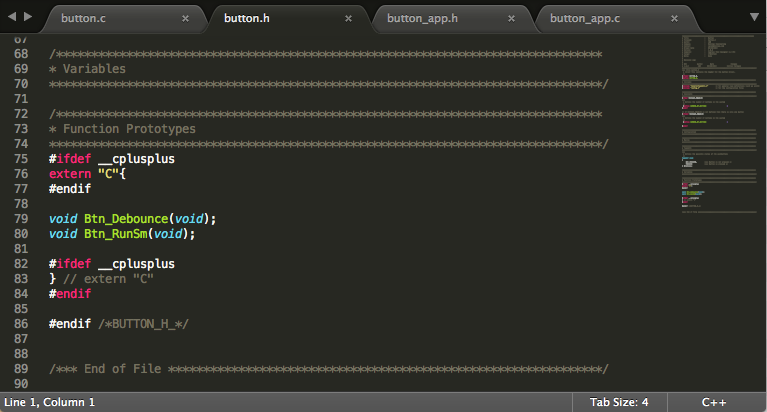 Figure 1 – Sublime Text 3
There are a lot of features of Sublime Text that make it a useful editor. First, it has the ability to do syntax highlighting and formatting for more programming languages than I knew even existed. Whether I am working in C/C++, Python or Java all I have to do is change the language setting in the lower right or use one of the keyboard shortcuts and the editor switching to that language syntax.
Second, a feature that I’ve found very useful is the ability to select multiple words simultaneously and rename them all at once. If that is too far out of the norm of a text editor it also has a convenient find and replace feature that can be displayed at the bottom of the editor. Probably one of the coolest features is the ability to do batch edits. I single line can be converted to a column where each entry can be edited at the same time, saving time and typing!
There are many additional advantages to this editor but the best way to learn them is really to try it. Sublime Text 3 is free to download and use on Mac, Linux or Windows. It doesn’t have a trial period but will periodically pop-up a window asking if you would like to purchase the editor. When I first started to use it my use was sporadic and didn’t warrant purchasing the editor but over time as I learned the editor in detail and realized the value it provides, I was more than willing to pay the small price to remove the pop-ups.
To try out this exceptional tool visit http://www.sublimetext.com/
Struggling to keep your development skills up to date or facing outdated processes that slow down your team, raise costs, and impact product quality?
Here are 4 ways I can help you:
- Embedded Software Academy: Enhance your skills, streamline your processes, and elevate your architecture. Join my academy for on-demand, hands-on workshops and cutting-edge development resources designed to transform your career and keep you ahead of the curve.
- Consulting Services: Get personalized, expert guidance to streamline your development processes, boost efficiency, and achieve your project goals faster. Partner with us to unlock your team's full potential and drive innovation, ensuring your projects success.
- Team Training and Development: Empower your team with the latest best practices in embedded software. Our expert-led training sessions will equip your team with the skills and knowledge to excel, innovate, and drive your projects to success.
- Customized Design Solutions: Get design and development assistance to enhance efficiency, ensure robust testing, and streamline your development pipeline, driving your projects success.
Take action today to upgrade your skills, optimize your team, and achieve success.