Embedded Toolchain TCO: The Hidden Cost of Free Compilers
Ask a procurement manager or a software lead why they use open-source toolchains, and you’ll likely hear the same shrug: “Why pay for what you can get for free?”
It’s a fair question on the surface.
Free tools have a tempting $0.00 line item on procurement’s spreadsheet. But in production-grade embedded development, “free” is the most expensive word in embedded development.
When you cut a check for a commercial embedded toolchain, you aren’t actually buying a compiler. Compiling code is a commodity; virtually any open-source tool can turn source text into binaries.
Instead, you are purchasing a subscription to a massive umbrella of invisible engineering infrastructure, the things that directly dictate your true embedded toolchain TCO, or Total Cost of Ownership.
You are paying for debugging depth, automated code-quality enforcement, pre-certified functional-safety binaries, support SLAs that keep engineers moving, multi-architecture flexibility, and licensing infrastructure that integrates with modern continuous integration (CI) pipelines.
Dismissing commercial tools as legacy overhead is a mistake. When you choose the free route, the costs aren’t really zero dollars.
The costs morph into lost developer hours, missed launch windows, or catastrophic certification rework. Which, most of the time, is way more expensive than the savings you’ve made from buying free tools.
Let’s look past the spreadsheet illusion and calculate the actual, invisible line items of embedded toolchain TCO.
Debugging Depth: Hours of Root-Causing vs. Days of Guessing
Here’s what you should know: free debuggers cost companies hundreds of hours per developer every single year. I know, because I used to only use free debuggers since they were “low cost”. Then I started working with commercial tools, and it completely changed not just the way I worked, but the way I thought about free versus commercial tools. Let’s take a moment to think this through.
Industry benchmarks show that software developers spend roughly 50% of their programming time just trying to figure out why their code is broken. I call this failure work, but the rest of the industry calls it debugging. (Jack Ganssle used to quip that if there is a debugging phase, there must be a bugging phase!)
If you look at embedded discussions on Reddit or StackOverflow, that number regularly hits 80%. That seems extreme, but for years I’ve asked attendees at my talks and conferences how much time they spend debugging, and 40 to 80% is a pretty typical range. It’s also, sadly, remained relatively constant over the last decade or so.
Assuming a standard engineering schedule, that works out to an incredible 1,000 to 1,600 hours spent debugging per developer, per year! (Yeah, look at that closely because it’s an insane number . . .)
Part of this debugging nightmare comes down to the very workflows and tools developers use. For example, the default workflow with free tools is almost always a basic, GDB-style step-and-watchpoint routine. It’s the equivalent of looking through a keyhole to see what’s happening inside a burning house.
Advanced commercial debugging tools give teams instant access to:
- Unlimited complex, hardware-assisted breakpoints (combining code and data triggers)
- Real-time variable watchpoints, live profiling, and hardware code coverage
- Visual execution timelines synced precisely with hardware interrupts
- Power logging tightly correlated with trace data to hunt down energy leaks
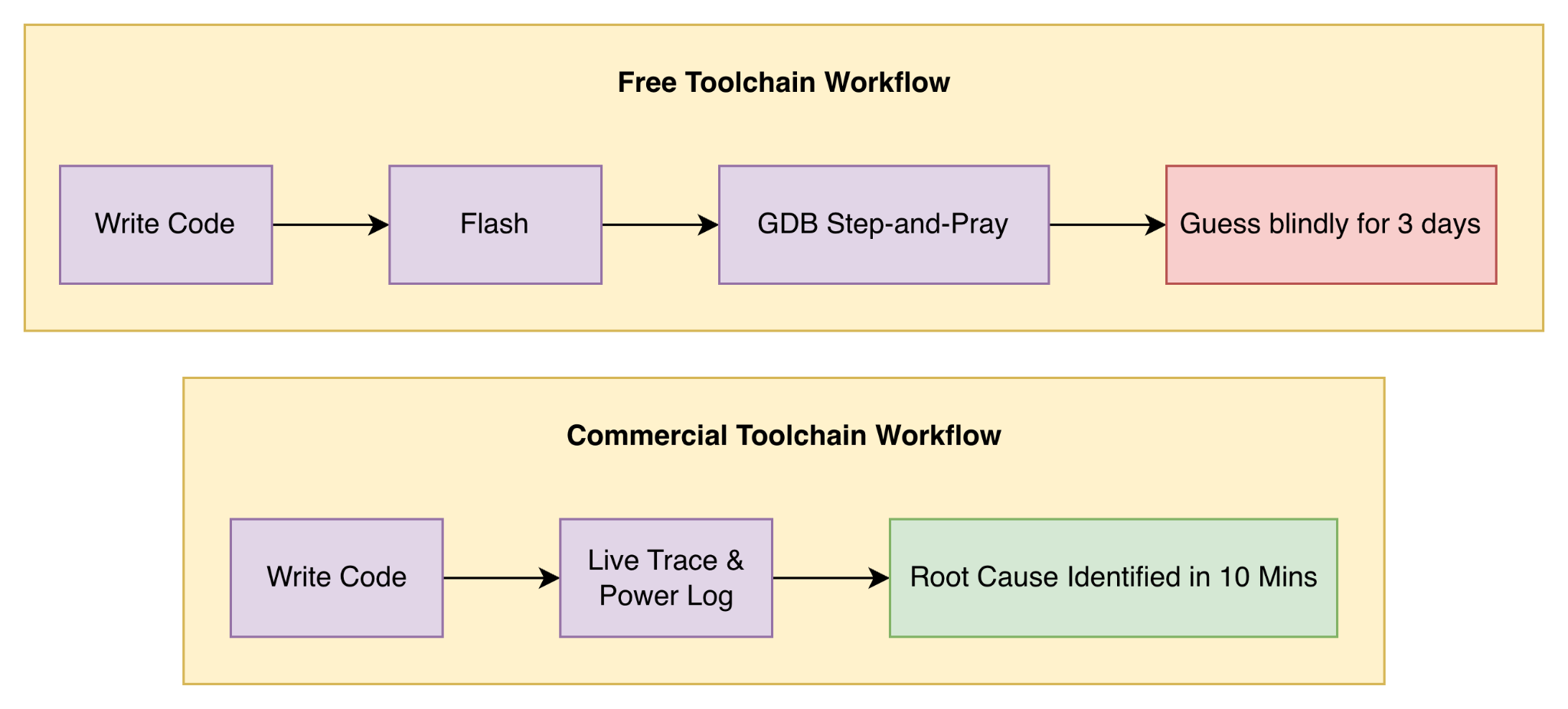
Moving from blind guessing to advanced hardware trace tools can yield an 80% to 90% reduction in debugging time.
Take a tool like the IAR C-SPY Debugger as a worked example. IAR has documented real-world cases where debugging cratered from 80% of a team’s development cycle down to under 5% [1, p. 14].
That is the difference between shipping a patch this afternoon vs. delaying the release by three weeks.
Code Quality: Catching Defects Before They Reach Test
If a bug makes it out of the developer’s IDE, its cost multiplies exponentially. This is one of the biggest hidden drivers of embedded toolchain TCO.
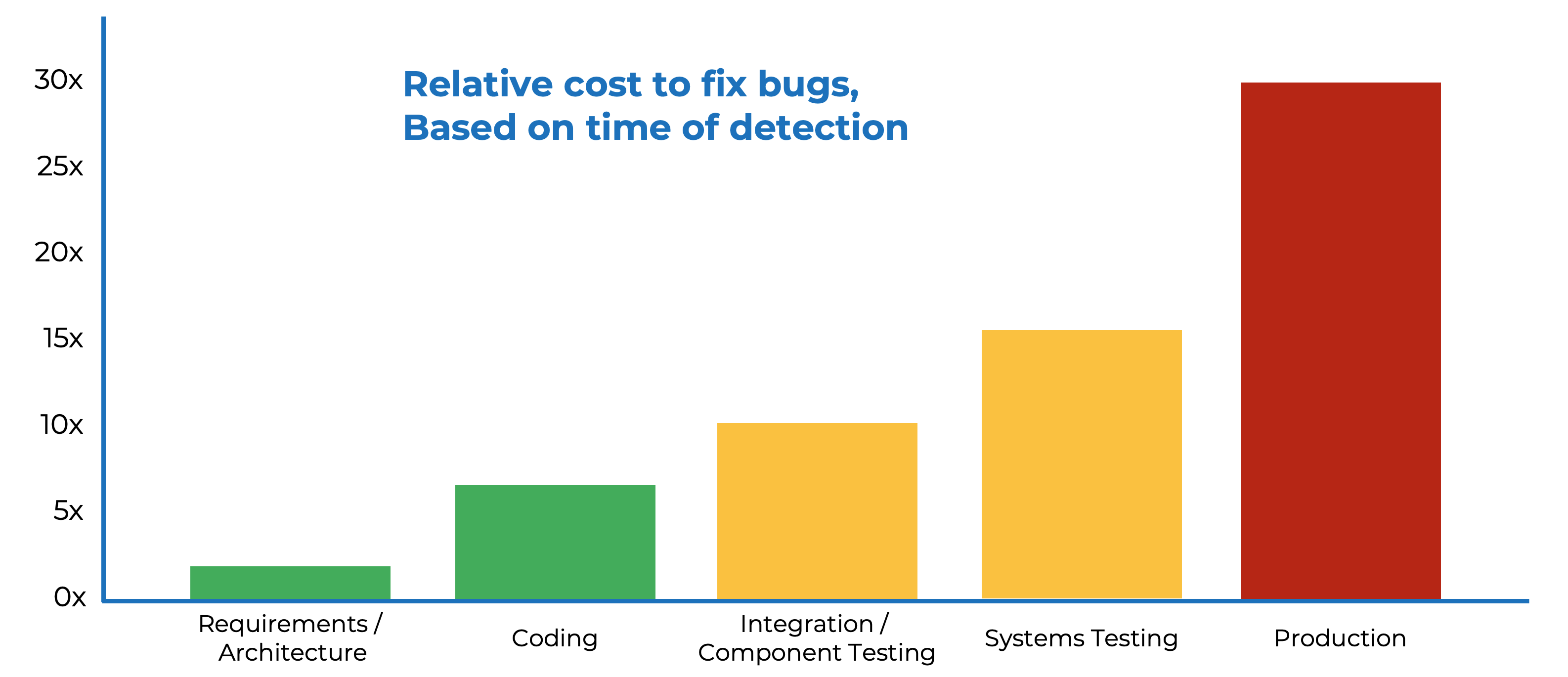
According to industry baselines from Steve McConnell’s Code Complete [2], an average development team injects roughly 70 bugs per 1,000 lines of code (KLOC) during initial development. Alarmingly, about 15 of those bugs slip through internal loops and reach final customers.
Fixing a bug that has already been deployed to a physical, embedded device in the field costs up to 6 times more than fixing it while writing the line of code.
Static analysis built natively into the compiler workflow moves defect discovery as far left as possible.
A study published by the ACM regarding Google’s internal workflows [3] uncovered a fascinating psychological reality: compile-time issues flagged as errors are treated as “real problems” by developers 74% of the time, whereas warnings relegated to a separate dashboard or post-build report are acted on just 21% of the time.
If it isn’t in the developer’s immediate workflow, it gets ignored.
Historical data from Dr. Dobbs also shows that defect injection drops by 41% [1, p. 17] the moment strict coding standards are actively enforced by the toolchain.
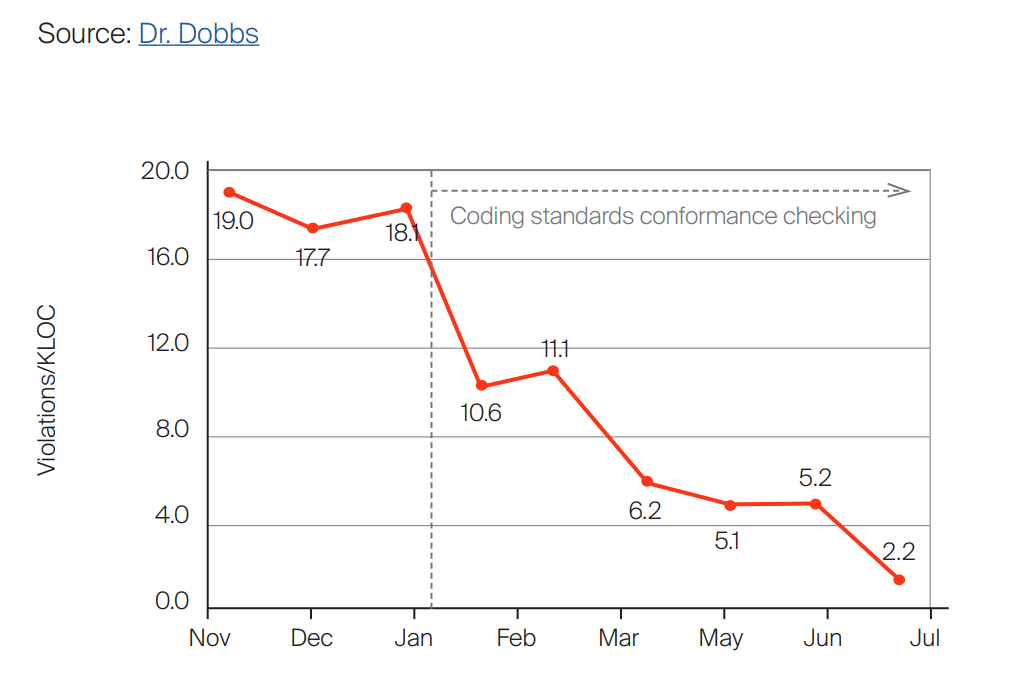
Integrating native checkers such as IAR C-STAT (static analysis) and IAR C-RUN (runtime analysis) directly into the compilation process forces compliance before the code even gets flashed into the hardware.
Certified Compilers: Take Qualification Off the Team’s Plate
If you are developing a safety-critical project under regulations like ISO 26262 (automotive), IEC 61508 (industrial), IEC 62304 (medical), or EN 50128 (railway), you face a brutal binary choice. You either:
- Buy a pre-certified toolchain, or
- Validate your own
Many teams blindly choose the latter, completely misunderstanding what “validating your own open-source toolchain” actually demands. (For a deeper look at that decision, see DIY vs. buy toolchain validation for functional safety.)
It means your engineering team is now responsible for:
- Running and maintaining thousands of complex language-validation program suites.
- Executing comprehensive ISO standard-conformance test libraries.
- Managing brittle regression suites like DejaGNU, Plum-Hall, or Perennial.
- Authoring mountains of compliance reports, traceability matrices, and deviation justifications for regulatory auditors.
According to toolchain validation metrics [4], this DIY compliance effort drains 6 to 12 months of calendar time and requires 2 to 4 full-time engineers.
Based on average U.S. embedded software engineer salaries of ~$153,367/year, that equates to $306,000 to $613,000 in overhead cash burn. And that doesn’t even account for third-party audit fees or the massive cost of a delayed product launch.
Using a pre-certified commercial compiler slashes up to 12 months off your functional safety validation schedule right out of the gate, and takes a huge chunk out of your embedded toolchain TCO.
Support Response Times: Keeping a Stalled Team Productive
When an open-source compiler throws an internal segment fault, drops an optimization flag unexpectedly, or miscompiles a complex macro, your engineering velocity hits a brick wall.
The official GCC FAQ explicitly outlines your three choices when something breaks:
- Fix the compiler source code yourself,
- Post your issue to an open bug tracker and pray a volunteer responds, or
- Hire an expensive outside consultant.
Every single one of those choices carries the exact same devastating penalty: a stalled engineering team.
If a toolchain bug blocks a team of 5 engineers for a week, you are losing time plus burning thousands of dollars in unproductivity. Toolchain maintenance and troubleshooting quickly swell to absorb roughly $3,400 per month in hidden developer distraction [1, p. 20], a line item most teams never even track in their embedded toolchain TCO analysis.
Commercial toolchain subscriptions provide predictability. Engineers get guaranteed hotfixes, technical escalation paths, and direct access to local field applications engineers working on the same timeline.
Multi-Architecture Coverage: One Toolchain Across Arm, RISC-V, RX, RL78, and RH850
Embedded roadmaps are highly volatile.
A chip shortage hits, a vendor shifts pricing, or an accelerator requirement changes, and suddenly your team is forced to manage a mixed-silicon environment.
You are now handling an Arm application processor, evaluating RISC-V for a custom hardware block, and maintaining legacy Renesas RX, RL78, or RH850 microcontrollers for automotive or industrial subsystems.
If you rely on free, vendor-provided tools, you end up paying for your toolchain three times over in lost context.
A separate, fragmented toolchain for every architecture multiplies your engineering friction:
- Separate licensing administration and vendor agreements.
- Siloed, highly customized CI configurations that break independently.
- Unique safety qualification artifacts for every individual architecture.
- Completely different debugging interfaces, IDE layouts, and keyboard shortcuts.
The ramp-up cost to jump between these disparate environments is roughly one full working week of basic learning plus two days of tutorials. That translates to $2,000 to $2,800 in lost efficiency per developer, every time they switch context.
For a 20-engineer team spanning 3 or 4 architectures, you are looking at six figures of flushed productivity on initial training alone.
Instead of juggling three different IDEs, standardizing on a single ecosystem like IAR Embedded Workbench lets your team use the same interface, build settings, and debug layout across Arm, RISC-V, and Renesas silicon alike, which is exactly where embedded toolchain TCO starts trending in the right direction.
Licensing That Doesn’t Break When the Team Moves to CI
The modern embedded world is moving fast toward automated software pipelines. (If you haven’t built one yet, start with reproducible builds as the foundation for embedded CI/CD.)
But here is the hard reality: hardware dongles and legacy node-locked seats do not scale.
The exact moment a team attempts to modernize their workflow by shifting to ephemeral CI/CD runners, Docker containers, or cloud-based compilation instances, legacy licensing models fail.
Containers are designed to spin up, run a build on a new Git commit, and tear down within minutes. Anything tied rigidly to a specific physical MAC address or a USB dongle plugged into a server rack acts as a hard blocker on build parallelism.
It completely defeats the entire purpose of modern DevOps automation.
The modern alternative requires a modern architectural licensing model: capacity-based licensing that floats seamlessly across dynamic cloud containers, distributed CI runners, and physical developer workstations. You should pay for the concurrent capacity your automated pipelines actually consume, not the physical location of the workstation.
| Metric | Legacy IDE Build (Windows) | Headless Container Build (Ubuntu) |
|---|---|---|
| CI/CD Build Time | Baseline (100%) | ↓ 50% Reduction |
| Runner Infrastructure | Dedicated, Static HW | Ephemeral, Scalable Cloud |
Shifting to headless build engines designed natively for Linux environments yields a massive performance dividend, slashing CI/CD build times by up to 50% compared to triggering heavy, graphical IDE instances on Windows build servers.
Compiler Optimization Lowers Your Physical BOM
Beyond the massive savings in developer velocity and compliance engineering, investing in a top-tier compiler provides a direct, measurable reduction in your physical Bill of Materials (BOM) costs, one of the few embedded toolchain TCO line items that shows up on the hardware balance sheet.
Because advanced commercial compilers feature highly sophisticated optimization engines, they routinely generate tighter, faster machine code than generic open-source alternatives. IAR compilers regularly deliver an execution performance boost of up to 30% over GCC running on identical microcontroller silicon.
That optimization advantage means two things:
- Your application logic can suddenly fit into a smaller, cheaper flash memory size, or
- Run at a lower clock speed to save battery life.
Either way, saving just $1 to $4 per physical microcontroller translates to $10,000 to $40,000 in direct savings per product series at even modest production volumes.
Conclusion
When you calculate the total embedded toolchain TCO across debugging, quality control, certification, support safety nets, and physical hardware efficiency, the upfront cost of a commercial subscription frequently offsets hundreds of thousands of dollars in hidden engineering waste.
But to be absolutely clear: commercial toolchains aren’t universally required for every single project.
If you are building a proof-of-concept hobbyist prototype, an educational project, or a quick one-off lab benchmark, a free toolchain is a completely reasonable and logical choice.
But the moment you shift to a commercial product running on a strict market timeline with real safety regulations, real BOM targets, and a real engineering payroll, choosing the cheaper path simply guarantees you’ll pay the bill somewhere your team isn’t looking.
So, stop letting hidden engineering friction bleed your product’s margin. Explore the IAR Platform today and see how optimized, integrated development infrastructure can accelerate your embedded roadmap.
References
- IAR Systems, The 12 Fundamentals of Embedded Software Development, Uppsala, Sweden: IAR Systems, 2023. https://www.iar.com/globalassets/e-book.pdf
- Steve McConnell, Code Complete, 2nd ed., Microsoft Press. https://www.amazon.com/gp/product/0735619670/
- Sadowski et al., “Lessons from Building Static Analysis Tools at Google,” Communications of the ACM. https://cacm.acm.org/research/lessons-from-building-static-analysis-tools-at-google/
- IAR Systems, “Why Validating Your Own Toolchain for Functional Safety is Costly and Time Consuming.” https://www.iar.com/knowledge/learn/why-validating-your-own-toolchain-for-functional-safety-is-costly-and-time-consuming
Want embedded engineering insights like this delivered to your inbox? Sign up for my Embedded Bytes newsletter to get the latest posts, insights, and hands-on tips delivered straight to your inbox.
Struggling to keep your development skills up to date or facing outdated processes that slow down your team, raise costs, and impact product quality?
Here are 4 ways I can help you:
- Embedded Software Academy: Enhance your skills, streamline your processes, and elevate your architecture. Join my academy for on-demand, hands-on workshops and cutting-edge development resources designed to transform your career and keep you ahead of the curve.
- Consulting Services: Get personalized, expert guidance to streamline your development processes, boost efficiency, and achieve your project goals faster. Partner with us to unlock your team's full potential and drive innovation, ensuring your projects success.
- Team Training and Development: Empower your team with the latest best practices in embedded software. Our expert-led training sessions will equip your team with the skills and knowledge to excel, innovate, and drive your projects to success.
- Customized Design Solutions: Get design and development assistance to enhance efficiency, ensure robust testing, and streamline your development pipeline, driving your projects success.
Take action today to upgrade your skills, optimize your team, and achieve success.