
Is RTOS Performance affected by an MPU?
If you’ve ever wondered what difference an MPU makes in RTOS performance you’re not alone. Enabling MPU support can help ensure that your RTOS can use the MPU to detect stack overflows, or invalid memory accesses from within a task. If you want to develop a secure and robust application, leveraging the MPU and additional features of the RTOS can be critical, but they don’t come without cost.
In this post, we’ll briefly explore the difference that an MPU can make on performance using data and settings from my 2024 RTOS Performance Report. We will specifically look at Zephyr RTOS.
What does an MPU do?
An MPU (Memory Protection Unit) is a hardware feature that provides memory access control and protection, ensuring that code and data integrity are maintained during execution. It defines memory regions with specific access permissions, such as read-only, read-write, or no access. The MPU monitors access attempts to these regions and triggers a fault or exception if an invalid access occurs, such as a task trying to access restricted memory or a stack pointer trying to access memory outside the stack.
The MPU is essential for embedded systems using real-time operating systems (RTOS) or multi-tasking environments. It helps isolate tasks, preventing one task from accidentally or maliciously corrupting the memory or data of another. This isolation improves system stability, security, and debugging by detecting and addressing memory access violations early. While not as comprehensive as a Memory Management Unit (MMU), an MPU is effective for resource-constrained systems where simple but efficient memory protection is needed.
Using the MPU in a Real-Time Operating System (RTOS)
Many RTOSes can enable the MPU if supported on the underlying hardware. Let’s discuss a couple ways that the MPU is used so that you can understand how performance is impacted.
Task Isolation
One of the most important functions of an MPU in an RTOS is to provide task isolation. By configuring different memory regions with specific access rights for each task, the MPU ensures that tasks cannot access each other’s memory or system-critical areas (e.g., kernel space) unless explicitly allowed. This helps to prevent faults, malicious behavior, or bugs from one task impacting the entire system, thereby improving reliability and fault tolerance.
Stack Protection
The MPU can be used to set up guard regions around each task’s stack. Suppose a task tries to overflow its stack (e.g., due to a programming error or unexpected data input). In that case, the MPU can detect this access violation and trigger an exception or system reset, preventing further corruption or erratic system behavior. This is particularly useful in debugging, as it helps developers quickly identify and address stack-related issues.
Privileged and Unprivileged Execution
An MPU allows for the separation of execution privileges in a system. Tasks can run in either privileged or unprivileged mode, with unprivileged tasks having limited access to hardware resources and critical system functions. This minimizes the risk of unintended system behavior or security breaches by limiting what each task can do. An RTOS like Zephyr can use this feature to enforce policies that ensure only trusted code can execute privileged operations.
RTOS Performance Impact of Enabling the MPU
While using an MPU provides significant advantages in terms of security and system integrity, it also introduces some overhead like context switch time and additional setup time.
Whenever the RTOS switches tasks, the MPU registers may need to be reconfigured to reflect the new task’s memory permissions and access rights. This operation can slightly increase the context switch time, depending on the hardware architecture and the number of MPU regions being reconfigured. For time-sensitive applications, accounting for this overhead and optimizing MPU configuration to balance security and performance is essential.
Initializing and configuring the MPU at system startup also requires additional code execution. Although this is a one-time setup cost, it adds to the system’s boot time. Optimizing the initialization sequence to minimize this impact is vital, especially in applications requiring fast startup times or involving safety-critical applications.
RTOS Performance with an MPU
When I was putting together my RTOS Performance Report for 2024, we started with the default configuration for Zephyr. The default configuration made sense because this was the most likely configuration developers would use.
Taking performance measurements resulted in the following:

As you can see, Zephyr’s preemptive scheduler did not compare well to other RTOSes! However, in my opinion, this probably is not a fair comparison. Even though the RTOSes were all in a default configuration, Zephyr had additional settings enabled that affected performance, such as:
- An enabled MPU
- Assertion checking
- Run-time error checks
RTOS Performance with an MPU
What do you think might happen to the performance if these three checks are disabled? Take a look at the following diagram to see the change in Zephyr’s preemptive schedulers performance:
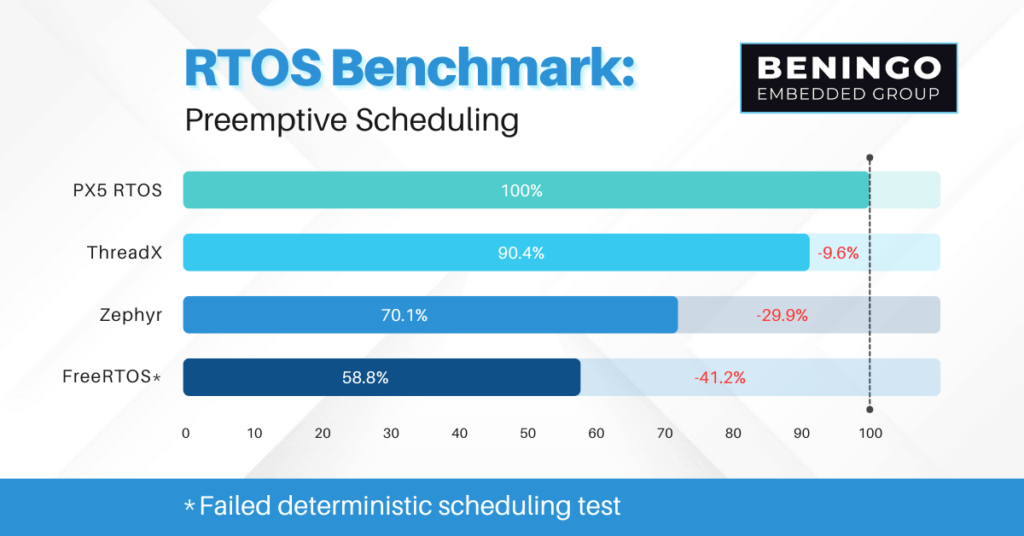
Zephyr jumped from a relative performance against PX5 RTOS of 42% to 70.1%! That’s a 28% improvement in the benchmark and a nearly 67% improvement against itself! All because the MPU and a few additional checks were disabled!
You might argue that disabling the MPU in the benchmark is cheating, but since the other RTOSes in the study did not have them enabled, it really levels the playing field and makes it possible to compare the RTOSes more accurately.
Next Steps
As seen in today’s post, enabling an RTOS’s MPU and other error-checking capabilities can significantly impact your performance. It’s a bit of a double-edged sword. For a real-time application, you want the best performance you can get. At the same time, if you are building an internet-connected device or a device that needs high reliability and robustness, you can’t get away from using the MPU. However, you can tune the usage of these features to get a balance that works best for your requirements.
The RTOS Performance Report helps you understand the price you’re paying to enable the MPU and other error checks within your RTOS by showing you some relative numbers. The numbers won’t be the same for all RTOSes and configurations. However, I hope this gives you some additional insights into how an RTOS works and how configuring your RTOS can affect its performance and robustness.
If you find yourself struggling to optimize your RTOS or design your application, contact jacob@beningo.com for professional assistance.
Struggling to keep your development skills up to date or facing outdated processes that slow down your team, raise costs, and impact product quality?
Here are 4 ways I can help you:
- Embedded Software Academy: Enhance your skills, streamline your processes, and elevate your architecture. Join my academy for on-demand, hands-on workshops and cutting-edge development resources designed to transform your career and keep you ahead of the curve.
- Consulting Services: Get personalized, expert guidance to streamline your development processes, boost efficiency, and achieve your project goals faster. Partner with us to unlock your team's full potential and drive innovation, ensuring your projects success.
- Team Training and Development: Empower your team with the latest best practices in embedded software. Our expert-led training sessions will equip your team with the skills and knowledge to excel, innovate, and drive your projects to success.
- Customized Design Solutions: Get design and development assistance to enhance efficiency, ensure robust testing, and streamline your development pipeline, driving your projects success.
Take action today to upgrade your skills, optimize your team, and achieve success.