
Claude Code Skills: A Practical Guide for Embedded Developers
Most developers using Claude Code treat it like a smarter terminal. Type a request, get a response, repeat. It works. But it misses one of its most practical features: Claude Code skills.
A skill is a reusable, callable AI command defined in your repository that your entire team, including agents, can invoke consistently. Think of it as encoding your process into Claude rather than re-explaining that process every session. If you’ve already seen why Claude Code matters for firmware development, skills are the next step.
However, the problem is that most embedded teams never find this feature, or if they do, they aren’t sure what to make of it. Instead, they keep typing the same detailed prompts over and over, getting inconsistent output depending on who wrote the prompt and how much context they remembered to include.
In fact, embedded software and systems development involve many repetitive processes: user stories, requirements tracking, debug plans, code reviews, and documentation. These tasks follow repeatable patterns on every project. Claude Code skills let you encode those patterns once and reuse them across your entire team.
In this guide, I will explain what Claude Code skills are, walk through how to create one step by step, and share three concrete skills built specifically for embedded firmware workflows that you can start using this week.
What Are Claude Code Skills?
A Claude Code skill is a reusable, markdown-defined command stored in your repository that Claude Code can invoke on demand. Instead, skills are not one-off prompts saved in a notes file. They are first-class project artifacts, versioned alongside your firmware source code, and available to every engineer on the team.
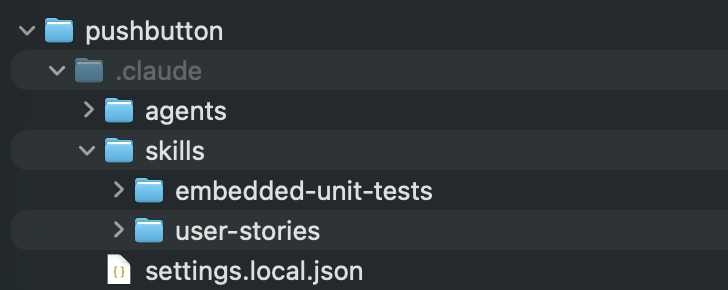
Skills live in a .claude/skills/ directory at your project root. Each skill gets its own subdirectory containing a SKILL.md file:
project-root/
  .claude/
    skills/
      user-stories/
        SKILL.md
      embedded-unit-tests/
        SKILL.md
        references/
          unity.md
          mocking.md
          edge-cases.md
      adr/
        SKILL.md
Each SKILL.md file has two parts: YAML frontmatter that tells Claude when to load the skill, and markdown content with the instructions Claude follows when the skill is invoked. The frontmatter controls the name, description, and invocation behavior. The markdown body defines the process Claude executes.
Think of skills as a way to create, manage, and extend Claude’s capabilities. Skills become part of Claude’s toolkit and are loaded into memory only when needed.
Note: You can also place skills in ~/.claude/skills/ for global use across all projects, as described in the official Claude Code skills documentation. Project-level skills live inside your repo and travel with it. The older .claude/commands/*.md pattern still works, but the skills directory is the recommended path going forward.
Why Embedded Developers Should Care About Claude Code Skills
Embedded workflows have unusually high process overhead. Requirements, debug sessions, communication protocol documentation, and code reviews. Yet every one of these tasks follows a repeatable pattern. The only thing that changes is the specific hardware interface, peripheral, or feature being developed.
Here is what that costs your team when you rely on ad-hoc prompting instead of Claude Code skills:
| Dimension | Ad-hoc Prompting | Claude Code Skills |
|---|---|---|
| Consistency | Varies by engineer | Same every time |
| Shareable | No | Yes, via version control |
| Versioned | No | Yes, like code |
| Onboarding value | Low | High |
The real impact shows up in three areas:
- Junior engineers stop guessing how to frame a request. Claude Code skills give them expert-level structure by default, which means less back-and-forth and fewer re-dos.
- Consistency across the team. Every user story, every unit test suite, every code review follows the same format regardless of who invoked the skill.
- Faster onboarding. A new engineer can call /embedded-unit-tests on day one and get a structured test suite that would have taken weeks of shadowing to learn to write independently.
I think the biggest shift here is recognizing that Claude Code skills are team infrastructure, not a personal productivity shortcut, even though they might start that way. They belong in version control for the same reason your MISRA C ruleset does.
How to Create Claude Code Skills
Now that you have a better understanding of what Claude Code skills are, let’s walk through how you create them. We’ll start with a generic process and then I’ll share several examples from real-world projects.
We’re going to walk through the manual process, so that you have the full understanding of what happens behind the scenes. Claude also has a skill-creator skill that can create new skills for you!
Step 1: Create the Skills Directory
Navigate to your firmware project root and create the directory:
mkdir -p .claude/skills/your-skill-nameOnce created, the directory name becomes the skill name. A directory called user-stories produces the /user-stories slash command. Commit this to version control from day one so every team member has immediate access.

Interested in going deeper? Join AI for Embedded Developers to learn how to apply skills, agents, and MCPs to create an Integrated Embedded Systems workflow.
Step 2: Write the SKILL.md File
Create a SKILL.md file inside the directory. Every Claude Code skill has two parts: YAML frontmatter that controls how Claude loads and invokes the skill, and a markdown body that contains the instructions Claude follows.
The frontmatter is the same regardless of skill complexity:
---
name: your-skill-name
description: One or two sentences describing exactly when Claude should
  load this skill. Be specific -- vague descriptions cause false positives.
---
Therefore, keep the description tight. Vague descriptions cause Claude to load a skill that does not match the task and waste context budget. Name the exact scenario the skill handles.
The markdown body is where the skill patterns diverge. The pattern you choose depends on how much structure the task requires.
Pattern A: Single-Shot Skills with $ARGUMENTS
For tasks that are well-defined and repeatable, use the $ARGUMENTS placeholder. It accepts dynamic input at invocation so the same skill works across every instance of that task:
---
name: debug-session
description: Generates a structured debug plan from a bug description.
  Use when starting a new debug session or documenting a known issue.
---

You are an embedded systems engineer structuring a debug session.

Create a debug plan for the following issue: $ARGUMENTS

Include:
1. Hypothesis list (most likely causes first)
2. Instrumentation points (breakpoints, logic analyzer, serial trace)
3. Test sequence (what to check and in what order)
4. Escalation criteria (when to involve hardware team)
Pattern B: Interactive Workflow Skills
Some tasks are too complex for a single prompt. Requirements generation is a good example. A feature description is rarely complete enough to generate useful output in one shot. The better approach is a skill that guides Claude through a structured multi-step workflow: gather input, ask clarifying questions, execute the process, and identify gaps.
Similarly, the frontmatter looks the same, but the body defines a workflow rather than a single instruction. You will see this pattern in the three examples later in this post.
Pattern C: Background Knowledge Skills
Not every skill needs to be user-invocable. Some Claude Code skills serve as background knowledge that Claude loads automatically when the context is relevant. These use two frontmatter flags:
---
name: adr-best-practices
description: Best practices for writing Architectural Decision Records
disable-model-invocation: true
user-invocable: false
---
With disable-model-invocation: true, only you can trigger the skill. With user-invocable: false, only Claude can invoke it automatically. This is useful for reference material and templates that should inform Claude’s behavior without appearing in your slash command list. Architecture decision records are a perfect use case, as you will see shortly.
Step 3: Test and Iterate
Invoke your skill and evaluate the output against what your team actually needs:
# Single-shot skill
/debug-session "SPI peripheral locks up after the third transaction"

# Interactive skill -- Claude will ask clarifying questions
/user-stories

# Check what skills are loaded and whether any are hitting context limits
/context
First-pass failures are normal for all three patterns. For single-shot skills, the most common issue is missing embedded-specific constraints. For interactive skills, it is usually a workflow step that does not map cleanly to how your team actually works. Treat the skill file the same way you treat a coding standard: review it, refine it, and update it as your project evolves.
Note: Skill descriptions are loaded into context and count against your context budget. Keep descriptions tight. If you build a large Claude Code skills library, run /context periodically to check whether any skills are being excluded due to the budget limit.
Claude Code Skills Embedded Developers Should Build First
If you carefully think through your development cycles and processes, you’ll find that there are a lot of potential skills that you can create. When I look at my own daily workflow, I have several dozen skills, agents, and MCPs that I use. These cover everything from creating user stories to writing firmware documentation to reviewing code.
Of course, many of those are quite advanced and something I’ve built up over the first several months of using skills. But if skills are new to you, I’d recommend a few simple ones to get started. The following three skills cover the three highest-friction areas I see in embedded teams: requirements, testing, and architectural documentation.
Skill 1: The User Story Generator
Let’s be honest. You typically don’t start a project with requirements. The problem is that firmware features need requirements before implementation, and the gap between a vague feature request and a ticket an engineer can implement against is where most schedule risk hides.
The user-stories skill is an interactive workflow skill. It does not just output a single story in response to a prompt. It guides Claude through a seven-step process:
- Gather input and ask clarifying questions (no more than 3-5 at a time)
- Identify roles: embedded software developer, application developer, system integrator, test engineer
- Decompose into stories using INVEST criteria: Independent, Negotiable, Valuable, Estimable, Small, Testable
- Prioritize: Critical, High, Medium, Low, with dependency awareness
- Write stories to individual files in a stories/ directory
- Generate a README.md story index with dependency flow and recommended implementation order
- Identify gaps: implied capabilities, error handling, initialization, edge cases
As a result, the output is not a single user story. It is a complete stories/ directory with individual .md files and an index:
stories/
  README.md                    # Story index, dependency flow, implementation phases
  001_uart_dma_receive.md      # Individual story files
  002_uart_error_handling.md
  003_uart_power_management.md
Each story file follows a consistent template with a story statement, acceptance criteria split into functional and technical sections, test scenarios in Given-When-Then format, and a definition of done checklist. The skill supports two modes: thorough (default, interactive with clarifying questions) and quick (one-shot generation when the description is complete).
Example invocation:
/user-storiesClaude then asks: what system or module are we working with? You drop in a description, point it at a document, or describe the feature in conversation. The skill handles the rest. The /context to first invocation turnaround time on a new module is typically under five minutes, and you end up with a structured backlog instead of a whiteboard full of sticky notes.
Skill 2: The Embedded Unit Test Writer
Writing unit tests for embedded firmware is genuinely harder than writing tests for application software, and as I’ve written before, TDD fails in most embedded teams because of friction, not the technique itself. Your code has hardware dependencies, timing constraints, and peripheral initialization sequences that do not exist in a server context. Before Claude can write a useful unit test for a peripheral driver, it needs to see every place that driver is called. A free code-search tool like AstroGrep is a fast way to surface that map of call sites before you hand the context over to Claude. Consequently, most engineers skip tests entirely because the setup cost is too high, not because they don’t see the value.
The embedded-unit-tests skill is an interactive workflow skill that knows the embedded testing landscape. It defaults to Unity, the lightweight pure-C framework that works on resource-constrained targets without pulling in a C++ runtime. But it also supports CppUTest and Google Test, and it picks the right one based on your project context.
What makes this skill different from a generic test-writing prompt is the supporting reference files in the skill directory:
.claude/skills/embedded-unit-tests/
  SKILL.md                 # Main workflow instructions
  references/
    unity.md               # Unity setup, assertions, test groups, fixtures
    cpputest.md            # CppUTest, CppUMock, memory leak detection
    googletest.md          # Google Test fixtures, Google Mock, parameterized tests
    mocking.md             # Dependency injection patterns, register mocking, peripheral fakes
    edge-cases.md          # Embedded-specific edge cases
The skill walks through four steps before writing a single test:
- Analyze the code under test: hardware dependencies, internal state, inputs/outputs, and edge cases
- Check testability: if the code directly accesses hardware registers, it recommends refactoring to dependency injection before proceeding
- Write tests using Arrange-Act-Assert with the naming convention test_<Module>_<Function>_<ExpectedBehavior>
- Cover embedded-specific edge cases from the reference library
That last point is where the reference files earn their place. The edge-cases.md file includes patterns your team might not think to add: 32-bit millisecond timer rollover at 49.7 days, circular buffer wraparound, register bit manipulation with full and empty registers, interrupt reentrancy, and communication timeouts just before and at the expiry boundary.
The mocking.md file covers dependency injection in C using function pointer structs, register abstraction, link-time substitution via CMake, and weak symbol patterns. It is the difference between a skill that generates superficial tests and one that generates tests you can actually run on a host machine.
Example invocation:
/embedded-unit-testsClaude asks which file or module to target, checks whether the code is testable, and then generates a complete test file with setup, teardown, and test cases. For a UART driver with DMA, that typically means tests for initialization, successful transfer, DMA alignment errors, overrun handling, and timeout behavior, covering both the happy path and the failure modes your integration tests will never catch.
Skill 3: The Architecture Decision Record Writer
Finally, Architecture Decision Records are one of those practices that every team agrees is a good idea and almost no team actually does consistently. But the reason is not laziness. It is friction. Writing a well-structured ADR from scratch takes time, and most engineers would rather ship code than argue over templates.
The ADR skill takes a different approach than the previous two. It is actually two background knowledge skills working together, which makes it a good example of Pattern C:
.claude/skills/adr/
  adr-template/
    SKILL.md     # disable-model-invocation: true, user-invocable: false
  adr-best-practices/
    SKILL.md     # disable-model-invocation: true, user-invocable: false
Both skills are background knowledge. They are not slash commands you invoke. Instead, Claude loads them automatically when the context suggests you are working on an architectural decision. Ask Claude to “write an ADR for choosing between FreeRTOS and Zephyr,” and it will apply the template and best practices without you having to ask.
The template enforces seven sections every ADR needs:
- Context: the background and constraints driving the decision
- Decision: what was chosen and why
- Consequences: positive and negative impacts, both stated explicitly
- Alternatives Considered: other options evaluated with reasons for rejection
- Compliance: how the decision will be verified, with a preference for automation
- Related ADRs: cross-references to dependent or related decisions
In particular, the Compliance section is worth calling out for embedded teams. It is not enough to document an architectural decision. You need to know how you will verify that the codebase is actually following it. For a decision like “all peripheral drivers must use dependency injection,” the compliance mechanism might be a CI check or a code review checklist item.
The best-practices skill adds quality guidance on top of the template: writing tips, anti-patterns to avoid, a checklist to verify before finalizing, and directory organization for managing ADRs at scale across embedded and cloud subsystems.
Example invocation (the skill activates automatically):
Write an ADR for our decision to use Zephyr RTOS instead of FreeRTOS
for the new motor controller firmware.
Then Claude applies the template and produces a structured document with the context of the decision, the reasons Zephyr was chosen over FreeRTOS, the trade-offs acknowledged, the alternatives evaluated, and the compliance mechanism defined. No blank page. No guessing at the format. The institutional knowledge is encoded in the skill.
Want these three Claude Code skills ready to drop into your project? Click here to download them.
Best Practices for Building a Claude Code Skills Library
Ultimately, forty mediocre skills are worse than six excellent ones. Here is how to keep your Claude Code skills library useful over time:
- Start with the tasks your team repeats most often and least enjoys documenting.
- Name skills for what they produce, not what they do. user-stories, not generate-requirements.
- Review skills during retrospectives the same way you review coding standards.
- Share skills across projects. Most embedded process patterns are project-agnostic.
- Retire skills that no longer match your workflow. Stale skills produce stale output.
Rather, the goal is a small, well-maintained library your team actually uses, not an archive of prompts nobody remembers exists.
Start Building Your First Claude Code Skill This Week
Claude Code skills are not a power-user feature you unlock after mastering the basics. They are the mechanism that turns Claude Code from a personal tool into team infrastructure. The three skills covered here address requirements, testing, and architectural documentation, but the same approach works for any repeatable process your team runs.
Here are three concrete steps to take this week:
- Pick one task your team does every sprint that follows a repeatable pattern. User stories, test scaffolding, ADRs, code reviews. Create a skill for it, commit it, and have one other engineer use it before the sprint ends. One data point beats a lot of planning.
- Add supporting reference files if the task has domain complexity. The embedded-unit-tests skill works because mocking.md and edge-cases.md are right there in the skill directory. Skills that reference external knowledge produce better output than skills that rely entirely on the model’s training data.
- Review your skills the same way you review your code. A skill you wrote for your first module will need updates by module ten. Put it on the retrospective agenda. Version it. Retire it when it stops being accurate. Treat it like the engineering artifact it is.
In the end, the investment is low. Creating your first Claude Code skill takes under an hour. The return is a consistent, versioned, shareable AI workflow that every engineer on your team can use from day one. That is not a productivity trick. That is a competitive advantage.
Reflection question: Which repetitive task in your firmware workflow costs your team the most time, and could a well-written Claude Code skill eliminate that friction entirely?
Don’t miss the rest of this series. Sign up for my Embedded Bytes newsletter to get the latest posts, insights, and hands-on tips delivered straight to your inbox.
Struggling to keep your development skills up to date or facing outdated processes that slow down your team, raise costs, and impact product quality?
Here are 4 ways I can help you:
- Embedded Software Academy: Enhance your skills, streamline your processes, and elevate your architecture. Join my academy for on-demand, hands-on workshops and cutting-edge development resources designed to transform your career and keep you ahead of the curve.
- Consulting Services: Get personalized, expert guidance to streamline your development processes, boost efficiency, and achieve your project goals faster. Partner with us to unlock your team's full potential and drive innovation, ensuring your projects success.
- Team Training and Development: Empower your team with the latest best practices in embedded software. Our expert-led training sessions will equip your team with the skills and knowledge to excel, innovate, and drive your projects to success.
- Customized Design Solutions: Get design and development assistance to enhance efficiency, ensure robust testing, and streamline your development pipeline, driving your projects success.
Take action today to upgrade your skills, optimize your team, and achieve success.