Embedded Development Environment: From IDEs to Integrated Workflows
There was a time when the embedded development environment was simple. You installed one vendor IDE, opened it, created a project, and wrote, compiled, flashed, and debugged code, all in one place. For a single developer working on one product and one chip, this worked well.
But that’s no longer how most teams operate. Teams are now distributed. Products target multiple architectures. Builds run in CI pipelines, not just on a developer’s machine. And onboarding a new developer shouldn’t require recreating a fragile, manual setup.
So, does this mean the IDE is no longer relevant? Not exactly.
This article looks at where IDEs still add value in the modern embedded development environment, where they fall short, and how teams can structure their toolchains to balance both.
Can One IDE Still Do It All?
For a long time, embedded development meant using one vendor IDE per project. You’d get the chip, download the vendor’s toolchain, and build your entire project inside their environment. The IDE handled the build system, the debugger, the flash programmer, and often the RTOS configuration. It was designed to be self-contained.
But that model is starting to become a bottleneck because the requirements around it have changed. Today, teams need:
- CI/CD pipelines that run from the command line
- Development environments that can be reproduced across machines
- Build systems that are not tied to a single vendor format
At the same time, modern frameworks are built around portable tools like CMake and CLI-based workflows, rather than a specific IDE. Even commercial toolchain providers are adapting by offering command-line tools and integrations that support more flexible workflows.
But before moving away from a vendor IDE, it’s important to understand what you might be giving up.
What Proprietary IDEs Still Do Better
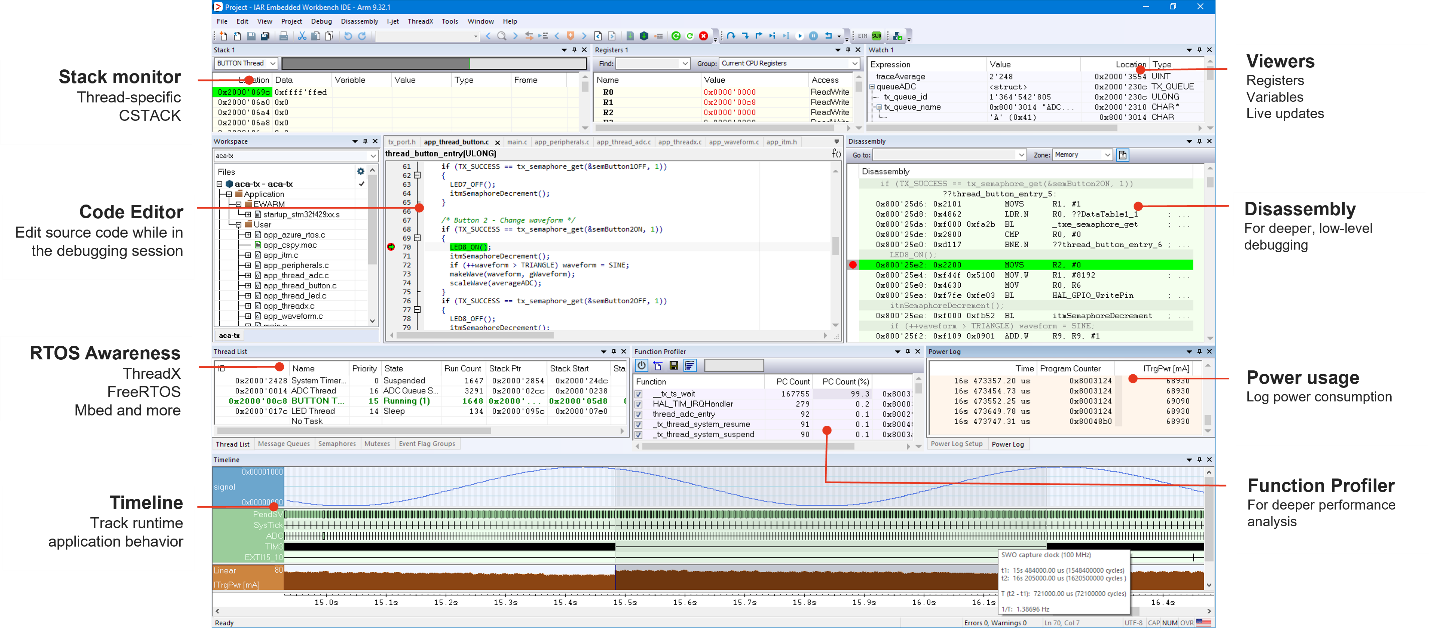
There is one area where proprietary IDEs still have a clear advantage: debugging. General-purpose editors can handle editing, building, and even flashing firmware with the right setup. But deep, hardware-aware debugging is different.
Mature embedded IDEs provide capabilities such as:
- Execution trace, including the ability to step backward
- RTOS-aware views showing tasks, priorities, and system state
- Code coverage linked directly to the build
- Peripheral register views mapped to the hardware
- Live watch windows that update without stopping execution
These are not minor conveniences. For complex or timing-sensitive systems, they are essential for diagnosing issues efficiently. Debugging already takes a significant portion of development time. Using weaker tools here can slow teams down considerably.
There is also the matter of certification. In industries like automotive, medical, and industrial systems, the toolchain itself may need to be certified. Pre-certified compilers, such as those carrying TÜV SÜD certification for ISO 26262, IEC 61508, and IEC 62304, are often closely tied to specific environments. Moving away from those environments is possible, but it requires careful verification to ensure compliance is maintained.
The key point is not to avoid change, but to understand what capabilities need to be preserved.
When Flexibility Becomes Fragmentation
While proprietary IDEs can limit flexibility, fully open toolchains introduce a different problem: inconsistency. As teams grow, two issues tend to appear.
Reason #1: Inconsistent Development Environments Lead to Inconsistent Builds
When each developer sets up their own environment, differences start to accumulate. One developer uses a newer compiler version. Another uses an older one. Build scripts behave differently across operating systems. Tool versions are not clearly documented.
Individually, these differences seem minor. But together, they create a system that is difficult to reproduce. When something fails (whether in CI or in production), teams spend time figuring out whether the issue is in the code or in the environment.
In regulated industries, this is more than an inconvenience. If builds cannot be reproduced reliably, it can impact compliance.
Reason #2: Important Capabilities Get Lost During Transition
Flexible toolchains often improve day-to-day development. But they can also lead teams to overlook less common, but critical, needs.
For example, a complex timing issue may require detailed execution tracing that was never set up. Or a safety audit may require coverage reports tied to a certified compiler, and the team discovers their open-source coverage tool doesn’t produce reports the auditor will accept.
These capabilities are not necessarily unavailable outside proprietary IDEs. However, they are easy to miss during a transition and costly to reintroduce later. Teams that focus only on development speed risk weakening their debugging and validation processes.
The Hybrid Workflow: Combining IDE Depth with Developer Freedom
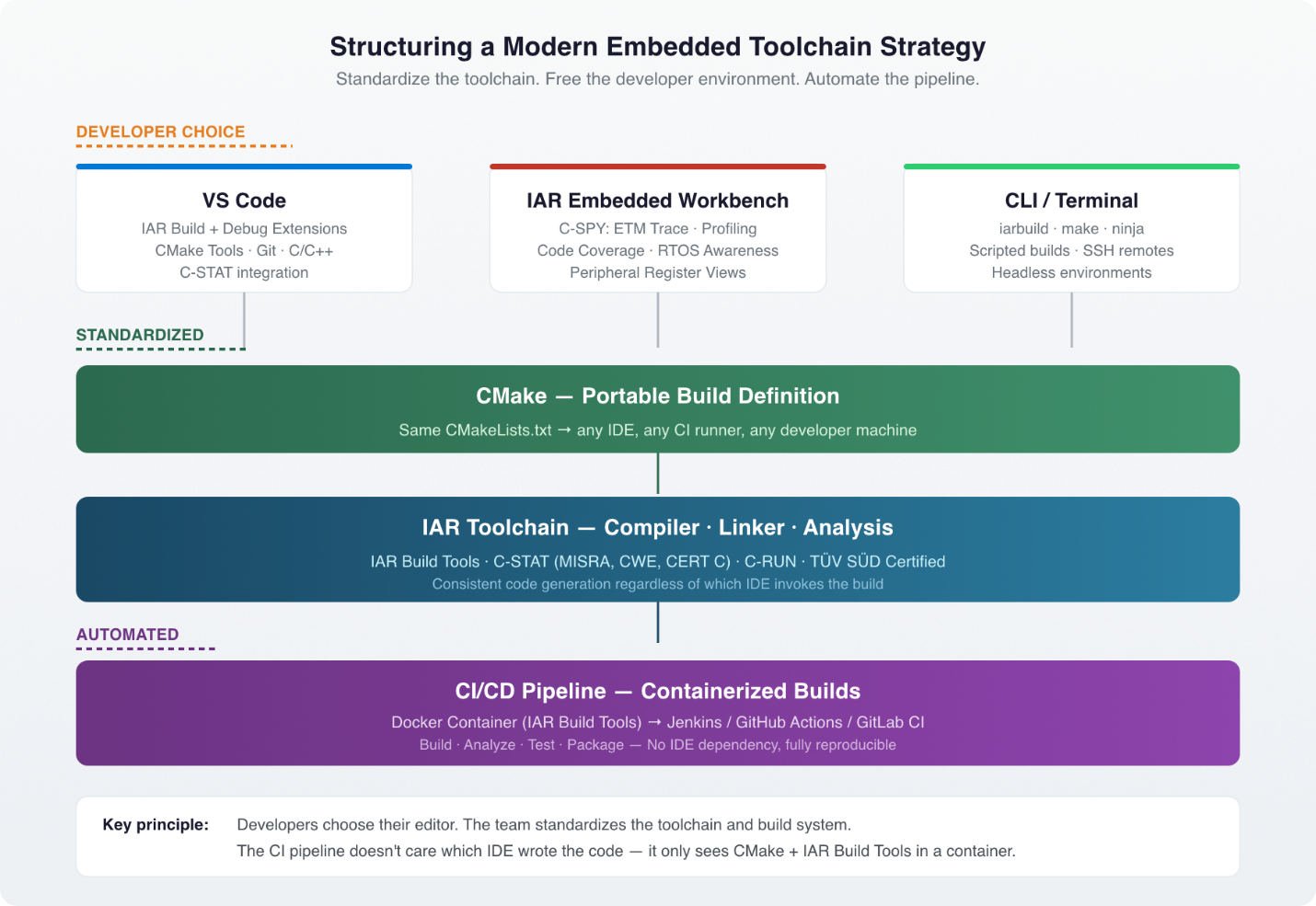
Many teams are finding that a hybrid embedded development environment works best. The idea is simple: standardize the underlying toolchain and build system, allow developers to use their preferred editors, and keep advanced debugging tools available when needed.
In practice, this means using a shared compiler and build configuration across all environments, defining builds in a portable format such as CMake, and retaining access to advanced debugging and analysis tools when required. The project builds the same way regardless of whether a developer opens it in VS Code, CLion, or a terminal.
IAR’s VS Code extensions, for example, bring the C-SPY debugger directly into VS Code, including breakpoints, memory inspection, live watch, and trace capabilities. Developers who prefer VS Code can code and debug there. Developers who need deeper analysis (ETM trace, full code coverage, RTOS-aware profiling) can open IAR Embedded Workbench for those sessions without disrupting the project structure.
The critical enabler is that the project itself isn’t locked to any one environment. A CMake-based project with IAR’s compiler can be opened in VS Code, built from the command line, debugged in Embedded Workbench, and compiled in a Docker container for CI, all without maintaining separate project files for each workflow.
Structuring a Toolchain Strategy for the Long Term
A hybrid approach only works if responsibilities are clearly defined. The general principle is: standardize what affects the output, keep everything else flexible. The following three steps provide a practical framework for building a hybrid embedded development environment that holds up over time.
Step #1: Lock Down the Toolchain and Build System
The compiler, linker, and analysis tools should be consistent across all environments: developer machines, CI systems, and build servers. This ensures that every build produces the same result. Using a portable build system like CMake helps ensure that the same configuration works across different tools and environments. The build definition should live in version control, alongside the source code, not inside a tool-specific project file.
IAR Build Tools support CMake natively and run from the command line on both Linux and Windows. This means the same toolchain that produces local builds also produces CI builds.
Step #2: Containerize the Build Environment
Packaging the toolchain and dependencies into a Docker container ensures consistency. With this approach, developers and CI systems use the same environment. New team members can get started quickly. Just pull the container, clone the repo, and build.
No wiki pages, no setup scripts, no debugging someone else’s PATH configuration. Builds can be reproduced reliably at any point in time because the container is versioned and stored alongside your releases.
For teams working across multiple architectures, containers also let you run Arm, RISC-V, and Renesas builds from different containers in the same CI pipeline, all orchestrated by the same automation layer. IAR provides pre-built Docker containers for their Build Tools, so teams can get a working containerized pipeline running without building the images from scratch.
Step #3: Separate the Developer Environment from the Toolchain
Once the toolchain is standardized, the choice of editor becomes a preference rather than a constraint. One developer uses VS Code with IAR’s build and debug extensions. Another prefers CLion with its CMake integration. A third works from the terminal and invokes builds directly. All three produce identical binaries because the underlying toolchain and build definition are the same. The project structure doesn’t change based on who opens it.
This flexibility improves productivity and reduces friction, especially when onboarding new team members or working across diverse teams.
The Real Test: Does It Scale?
A workflow that works for a small team may not hold up as the team grows. Two common mistakes tend to surface:
Mistake #1: Standardizing the Wrong Layer
Some teams try to standardize the editor (“everyone must use VS Code”) but leave the toolchain and build system to individual choice. This gets it backward.
The editor doesn’t affect the build output. What matters is the compiler version, the build flags, the analysis configuration, and the container image. Standardize those, and the editor choice becomes irrelevant to build quality. Standardize the editor instead, and you’ve imposed a constraint that doesn’t solve the actual consistency problem.
Mistake #2: Treating Licensing as an Afterthought
As teams grow, toolchain licensing becomes more complex. If licensing is tied to specific machines, it can limit scaling across developers, CI systems, and remote environments. Containers are ephemeral. CI runners spin up and tear down on demand. Node-locked licenses aren’t designed for that.
Capacity-based licensing, like the model IAR uses for their platform, lets license tokens be shared across developers, containers, and CI runners, which is better suited for modern, distributed workflows. Planning for this early avoids bottlenecks later.
Wrapping It Up
The single-IDE approach worked well for a simpler development model. But a modern embedded development environment requires more flexibility and scalability, and no single tool can meet all of those needs.
The solution is not to abandon IDEs, but to redefine their role. Separate the toolchain from the developer environment. Standardize the compiler, build system, and analysis tools. Containerize the build environment so it’s reproducible across machines and across time. And let developers choose their own editor while keeping advanced debugging capabilities accessible for the moments when nothing else will do.
Teams that take this approach are better positioned to scale and maintain their systems over time.
Want to see how a hybrid embedded workflow actually comes together? Explore the IAR platform, from VS Code extensions to containerized Build Tools, and start building a toolchain strategy that scales.
Want embedded engineering insights like this delivered to your inbox? Sign up for my Embedded Bytes newsletter to get the latest posts, insights, and hands-on tips delivered straight to your inbox.
Struggling to keep your development skills up to date or facing outdated processes that slow down your team, raise costs, and impact product quality?
Here are 4 ways I can help you:
- Embedded Software Academy: Enhance your skills, streamline your processes, and elevate your architecture. Join my academy for on-demand, hands-on workshops and cutting-edge development resources designed to transform your career and keep you ahead of the curve.
- Consulting Services: Get personalized, expert guidance to streamline your development processes, boost efficiency, and achieve your project goals faster. Partner with us to unlock your team's full potential and drive innovation, ensuring your projects success.
- Team Training and Development: Empower your team with the latest best practices in embedded software. Our expert-led training sessions will equip your team with the skills and knowledge to excel, innovate, and drive your projects to success.
- Customized Design Solutions: Get design and development assistance to enhance efficiency, ensure robust testing, and streamline your development pipeline, driving your projects success.
Take action today to upgrade your skills, optimize your team, and achieve success.