Zephyr Logging Subsystem: Best Practices for Better Performance
When an embedded application misbehaves, one of the first tools developers use is breakpoints. Unfortunately, breakpoints are one of the worst debugging tools known to man. They halt the processor, letting you inspect variables and single-step through the code to identify what went wrong. While breakpoints are familiar, they can consume an enormous amount of debugging time and are rarely efficient. What’s worse, in a real-time system, stopping execution also changes the behavior you’re trying to understand.
The Zephyr logging subsystem gives us a more efficient way to observe our application while it runs and find bugs faster. Messages can show what code executed, what state changed, and when an error occurred. You can capture an entire run and look for patterns instead of repeatedly stopping to inspect one moment and hoping that you find something useful. (Dare I mention AI can help analyze these logs wicked fast?)
While logging offers developers many advantages, it also adds overhead. How much and whether it impacts your system depends on how you configure it and what your debug strategy is. In this post, we’ll configure the Zephyr logging subsystem on the NXP FRDM-MCXN947, give application modules their own log levels, and measure the cost of keeping those messages. We’ll build on the Kconfig workflow from the previous posts and inspect what the configuration enables, then verify the result. If you are new to Zephyr, Getting Started with Zephyr RTOS walks through the toolchain and first build. By the end of this post, you’ll not only understand how to enable logging, but how to measure its impact and configure it around your application’s timing requirements.
Let’s dig in!
How the Zephyr Logging Subsystem Works
The Zephyr logging subsystem lets your application record messages about what it’s doing. Each message belongs to a module and has a severity level, such as an error or an informational update. You can then choose which messages to keep and where to send them. That gives you much more control than scattering printf calls throughout the application, or in the case of Zephyr, printk calls. The official Zephyr logging documentation covers the full feature set in reference form; this post focuses on the parts that most directly affect application behavior.
A module is a named source of log messages. It might represent your main application, a sensor driver, or a communications component. It doesn’t have to be a separate thread. The name tells you where a message came from, while its severity tells you how important that event is.
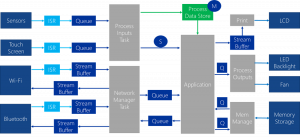
Before we add logging to an application, let’s look at the pieces we’re connecting. Figure 2 shows how a message gets from your code to an output. Messages describe events using four severity levels: error, warning, information, and debug detail. For example, an application might record an informational message containing its latest sample count. We’ll follow that message through the figure, then build a simple example ourselves.
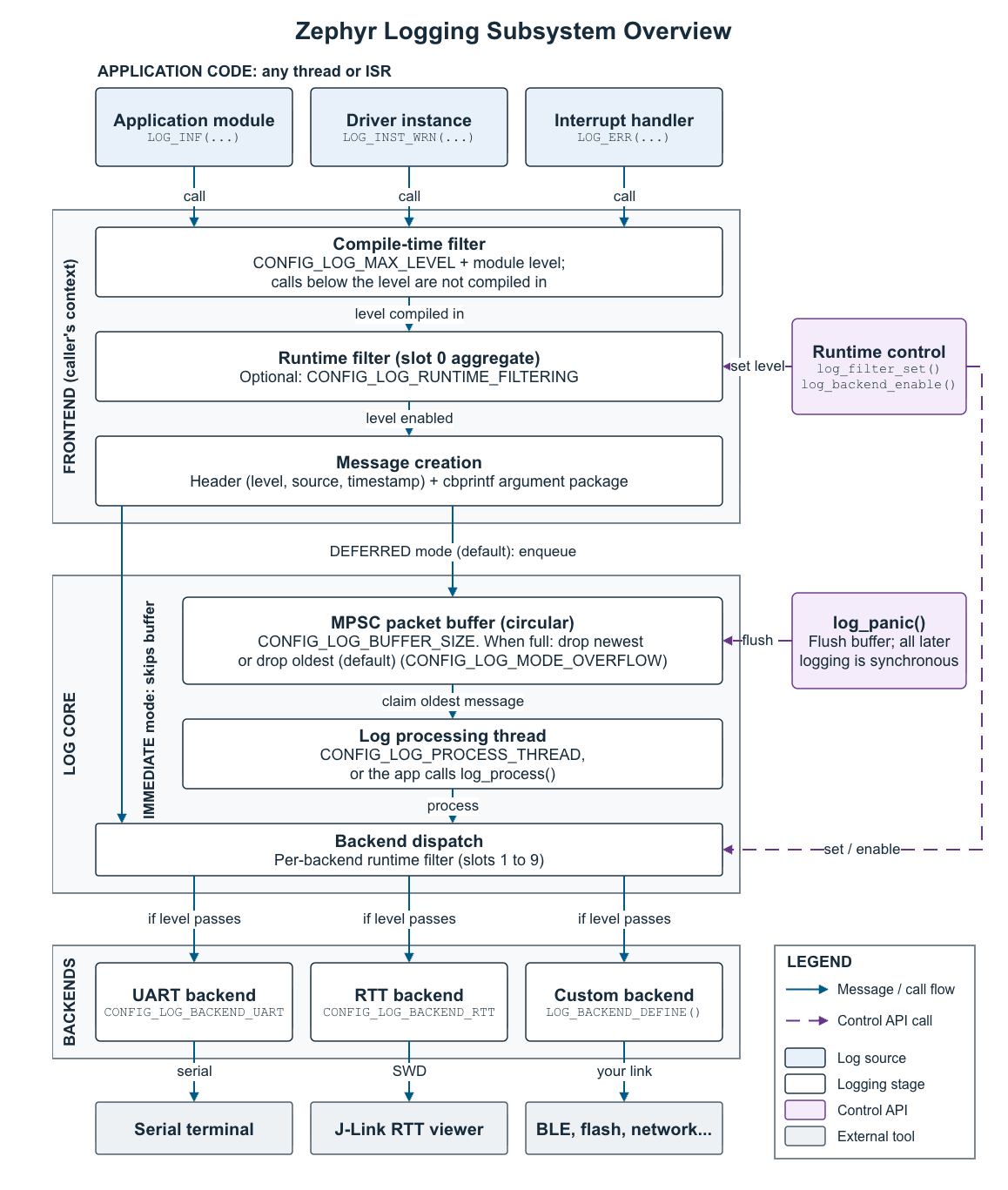
First, the module’s compile-time level and the global build settings determine whether the logging call is included in the application. If the module is set to WARNING, an informational call is excluded. It won’t create a message that later needs to be thrown away. This decision happens during compilation, even though it appears at the start of the figure’s message path.
The frontend is the part of the Zephyr logging subsystem that receives the application’s logging calls. If a call is compiled in and runtime filtering is enabled, it checks whether any active backend wants that module and severity. If none do, it returns without creating the message. Otherwise, it prepares the source, severity, creation timestamp, format information, and argument values. For our example, that includes the sample count’s value at the time of the call.
In deferred mode, that message is committed to a circular buffer. The figure labels it MPSC, which means multiple producers and a single consumer. Several application threads or interrupt handlers can produce messages, while the processing thread takes them out in order. This is the point where the calling code can return to its own work.
The processing thread then dispatches the message to the enabled backends. A backend checks its runtime filter, formats the message (if configured), and sends the result to its destination. A UART backend, for example, formats the output fields and transmits the line through a serial interface to a terminal on your development machine.
Notice the immediate-mode route in the figure. It skips the deferred queue and processing thread. Formatting and backend output take place before the logging call returns, in the same context that made the call. That context could be an application thread or an interrupt handler. The output may look similar on your terminal, but the effect on your application can be very different.
The purple connections show control calls rather than message flow. Runtime controls can change filtering and enable backends. Panic handling flushes pending messages and makes supported backends process synchronously when normal deferred processing can no longer be relied on. Those are controls around the same message path, not additional application outputs.
Once you can follow that path, the configuration options make much more sense. A module level controls which calls exist. Runtime filters control which compiled-in messages are wanted. Buffer settings control where pending messages wait. The backend determines how output leaves the target. Now let’s put those pieces together and get our first message onto the console.
Adding Logging to a Single Module
Let’s start with one module and get a message onto the console, assuming you’re starting from an example project like Blinky. First, enable logging in your application’s prj.conf:
CONFIG_LOG=y
CONFIG_LOG_MODE_DEFERRED=y
CONFIG_LOG_BACKEND_UART=y
These settings enable the Zephyr logging subsystem, select the deferred path we saw in Figure 2, and use the UART backend for output. The important distinction is that logging is a subsystem configured in Kconfig, not hardware that you configure in devicetree. The board’s hardware description provides the UART connection the backend will use.
Next, add the logging header and register a module. Once you do that, you can use LOG_INF to send messages. Here’s a complete main.c for a simple example:
#include <zephyr/kernel.h>
#include <zephyr/logging/log.h>

LOG_MODULE_REGISTER(app, LOG_LEVEL_INF);

int main(void)
{
    unsigned int count = 0;

    LOG_INF("Application started");

    while (1) {
        LOG_INF("Sample count: %u", count++);
        k_sleep(K_SECONDS(1));
    }

    return 0;
}LOG_MODULE_REGISTER gives our module the name app and sets its compile-time level to INFO. The LOG_INF calls create informational messages, so both are enabled. The loop prints a synthetic sample counter once per second so that you don’t need a sensor to try it out. If you want to replace the synthetic counter with a real reading later, the Zephyr sensor API walkthrough shows how to drive the on-board temperature sensor on an FRDM board.
That’s the basic setup! We’ve enabled logging, named the source of our messages, and added calls where we want to observe the application. Now let’s connect to the board’s console and verify that the messages reach our development machine.
Getting Messages onto the Console
For this example, we selected the UART backend shown in Figure 2. UART stands for universal asynchronous receiver-transmitter. We’ll use the board’s existing console connection to observe the output.
On the FRDM-MCXN947, the board’s devicetree already describes the console UART on Flexcomm 4. The board configuration provides the console support, so we don’t need an overlay for this example. Devicetree becomes relevant when you want to change the hardware connection: enable the desired UART, configure its pins and baud rate, and select the console through the zephyr,console chosen property. Kconfig enables the software that uses that hardware.
With these settings, we can build our application for frdm_mcxn947/mcxn947/cpu0, and flash the application. During development, we can use the onboard MCU-Link USB connector, J17, to view log information in the console by opening the board’s virtual serial port at 115200 baud, 8 data bits, no parity, and 1 stop bit.
You should see the startup message followed by an increasing count. The output normally identifies the time, severity, and module along with your message. Those fields help you reconstruct what happened when several modules are reporting events.
For example, a line from this application might look like the following:
[00:00:01.000,000] <inf> app: Sample count: 1Read that line from left to right. The timestamp identifies when the message was created. The <inf> tag identifies an informational message, app is the module we registered, and the remaining text is our message with the counter value substituted. That combination helps you connect events across modules. Timestamp format and resolution depend on the configuration; a long printed timestamp doesn’t necessarily mean you have microsecond timing accuracy.
If nothing appears, check the serial port, console configuration, and resolved build/zephyr/.config before adding more logging calls. Getting one known message working gives you a much better starting point than debugging the entire application at once.
Choosing Where the Messages Go
UART is one backend, but it isn’t the only one. SEGGER Real-Time Transfer (RTT) uses a buffer in target RAM that a compatible host tool reads through the debug connection. Other backends can send messages through a network connection or store them for later analysis. The application can keep using the same LOG_INF and LOG_ERR calls while the selected backend changes. A few examples of backend options include:
- UART: send messages to a serial console.
- RTT: transfer messages through a compatible debug probe.
- SWO: output through the Arm debug trace interface.
- Filesystem: write messages to files on mounted storage.
- Network/syslog: send messages to a remote syslog server.
- MQTT: publish messages to an MQTT broker.
- Bluetooth LE: transmit messages over a Bluetooth service.
- WebSocket: stream messages over a WebSocket connection.
- Semihosting: send output through an attached debugger.
- IPC service: forward messages between logging domains, such as processor cores.
- Platform-specific outputs: native host console, Xtensa simulator, EFI console, and Intel ADSP backends.
- Custom backend: implement your own destination, such as a RAM ring buffer.
The frontend and core decide which messages reach the backends. Each active backend can then apply its own runtime level and format and transmit the messages it accepts. You could keep detailed diagnostics on one output and send only warnings and errors to another. Multiple backends also mean additional processing and output work, so enable the ones you actually need.
For this post, we’ll send log messages over UART and view them in a serial terminal. To use RTT instead, enable CONFIG_LOG_BACKEND_RTT and CONFIG_USE_SEGGER_RTT. You’ll also need a compatible debug probe and software on your development computer, such as OpenOCD or J-Link RTT Viewer, to receive and display the messages.
Choosing Useful Messages and Log Levels
The next question that you’re undoubtedly asking is, “What should I log?” A useful message helps you understand a decision, state change, or failure. “Sensor initialization failed: %d” with an error code tells you much more than “Error!” printed from somewhere in the application.
Zephyr provides four severity levels:
LOG_ERR: a failure that needs attention.LOG_WRN: an unexpected condition or recoverable problem.LOG_INF: useful operational events, such as initialization or a state change.LOG_DBG: detailed information used while investigating behavior.
The severity level is a threshold, not a request to print only one kind of message. ERROR is the most severe level and has the numeric value 1. WARNING is 2, INFO is 3, and DEBUG is 4. A higher numeric threshold includes more detail, not more serious failures. Level 0 disables the module’s normal log messages.
The following table shows what each module threshold includes, assuming global build settings do not further restrict or override it:
| Module threshold | Messages retained |
|---|---|
| OFF (0) | None |
| ERROR (1) | Error |
| WARNING (2) | Error and warning |
| INFO (3) | Error, warning, and info |
| DEBUG (4) | Error, warning, info, and debug |
Here’s how you might use those levels while bringing up an application. These are illustrative call sites, not four events you should print on every pass through the loop:
LOG_ERR("Sensor is not responding");
LOG_WRN("Retrying the sensor read");
LOG_INF("Sensor initialized");
LOG_DBG("Sample count: %u", count);Use the severity to describe the event, not to force a message through the current filter. If a raw sample is debug detail, keep it at DEBUG and enable that level while you investigate. Labeling every message as an error makes both the filter and the output much less useful!
With our module set to LOG_LEVEL_INF, error, warning, and informational messages are included. Debug messages are excluded. That keeps the normal output readable while retaining the events most likely to help us understand the application.
Give each module its own level as the application grows. You may need detailed sensor messages while leaving communications at WARNING. Turning on DEBUG everywhere is an easy way to bury the evidence you actually need!
For a module spread across several source files, register it once and use LOG_MODULE_DECLARE(app, LOG_LEVEL_INF) in the others. Keep the declared level consistent. Otherwise, different parts of the same module can compile with different verbosity.
Once you want configuration control without editing C, use a per-module Kconfig symbol. Add the following to your application’s Kconfig file after its source "Kconfig.zephyr" line:
module = APP
module-str = app
source "subsys/logging/Kconfig.template.log_config"Then change the registration to:
LOG_MODULE_REGISTER(app, CONFIG_APP_LOG_LEVEL);Select CONFIG_APP_LOG_LEVEL_INF=y in prj.conf, and use CONFIG_APP_LOG_LEVEL in matching declarations too. Now the build configuration controls that module’s verbosity.
Logging Best Practices
So far, we’ve only sent one message per second. What happens when we add messages inside a fast thread or an interrupt service routine (ISR)? This is where the mode matters.
In deferred mode, the calling code packages an accepted message and places it in a buffer. A processing thread formats it and sends it through the backend later. That lets the calling thread get back to work without waiting for the complete line to reach the console.
Immediate mode performs formatting and backend output before the call returns. Put that call in an ISR, and you’ve added the output work to the interrupt handler. It’s worth thinking about that before adding “just one more message.”
For example, 60 transmitted characters at 115200 baud, with those serial settings, occupy the wire for about 5.2 milliseconds. Deferred mode doesn’t make the UART faster. It moves that output work away from the caller.
CONFIG_LOG_MODE_DEFERRED and CONFIG_LOG_MODE_IMMEDIATE select alternatives in Kconfig’s mode choice. For the normal application path shown here, start with deferred mode and check the timing on your target. Seeing a message sooner on the host is not, by itself, a good reason to move formatting and transport into a time-sensitive task.
There is also CONFIG_LOG_MODE_MINIMAL. It uses printk-style output with a smaller feature set, without the normal runtime filtering, timestamps, and backend processing path shown in Figure 2. It can help when footprint is the priority. Treat it as a different tradeoff rather than a faster version of the same fully featured configuration.
Filter Before You Pay for a Message
Compile-time filtering is one of the most useful performance controls. A DEBUG call excluded from the build doesn’t need to create a message or consume output bandwidth. Keep the levels your application needs, and remove detail you won’t use in that build.
CONFIG_LOG_DEFAULT_LEVEL supplies a level for modules that don’t specify one. With the global override disabled, CONFIG_LOG_MAX_LEVEL limits the levels compiled in across modules. For an INFO ceiling, use:
CONFIG_LOG_DEFAULT_LEVEL=3
CONFIG_LOG_MAX_LEVEL=3
CONFIG_LOG_OVERRIDE_LEVEL=0The override is worth calling out because it raises verbosity; it isn’t a way to quiet a noisy module. As we discussed in Tuning Zephyr Kconfig with AI, inspect the resolved configuration instead of assuming that a plausible prj.conf gives you the intended result. The Zephyr Kconfig option index is a handy reference while you are reading .config.
Runtime filtering, enabled with CONFIG_LOG_RUNTIME_FILTERING, lets you adjust verbosity without rebuilding. That’s useful for field diagnostics. It keeps the relevant code and strings compiled in and adds filter state and checks, though. It also can’t restore messages excluded at compile time. Use it when changing verbosity while the application runs is part of your debugging strategy.
Size the Buffer for Bursts
CONFIG_LOG_BUFFER_SIZE controls how much RAM is available for deferred messages. Size it around bursts and the time the processing thread may wait before running. Each message includes metadata and packaged arguments, so the printed character count is not its buffer requirement.
Also decide what should happen when the buffer fills. In Zephyr 4.4.2, CONFIG_LOG_MODE_OVERFLOW defaults to y, discarding older messages to make room. Set it to n to drop new messages instead. Do you want the beginning of the failure sequence or the most recent events? The policy should reflect that choice.
A larger buffer can absorb a burst. It can’t fix a continuous stream that exceeds the output capacity. For repeated failures, consider a rate-limited macro such as LOG_WRN_RATELIMIT and verify that rate limiting is enabled. Printing the same warning thousands of times rarely makes it easier to diagnose the problem.
Budget the Processing Work Too
The processing thread needs CPU time and its own stack. Its priority, wakeup threshold, and buffer size affect how quickly messages are handled. Giving it a low priority protects higher-priority work, but a thread that never gets to run won’t empty the queue.
CONFIG_LOG_PROCESS_THREAD enables the internal processing thread in deferred mode. CONFIG_LOG_PROCESS_TRIGGER_THRESHOLD controls the message count that triggers a wakeup, while CONFIG_LOG_PROCESS_THREAD_SLEEP_MS controls periodic wakeups where applicable. In the tested version, threshold 1 uses the empty-to-nonempty wakeup path. These settings affect when pending output starts processing, not the UART’s transmission speed.
CONFIG_LOG_PROCESS_THREAD_STACK_SIZE reserves the processing thread’s stack. Size that stack for the formatting and backend work it performs. Moving that work out of an application thread reduces the caller’s stack burden, but it doesn’t eliminate the need for stack space.
Pay attention to the arguments as well. Passing a changing local string can require copying its contents for later formatting. That costs more than packaging a couple of integers. Avoid expensive calculations performed only to build a message, and keep necessary application side effects outside logging arguments.
Keep Strings and Fault Paths in Mind
Deferred formatting also makes data lifetime important. Zephyr’s argument packaging can copy transient strings so that a local buffer can be reused after logging, but pointer types and the selected configuration influence that handling. Keep constant and transient strings distinct, test the path you use, and remember that copying string contents costs more than recording a couple of integer arguments.
If you replace the kernel’s fatal-error handler, preserve the logging shutdown behavior your application needs. The default handler in our tested version enters panic mode through LOG_PANIC(). A custom handler must make that decision itself. Even a flushed queue cannot preserve output across a sudden power loss if the transport never has time to send it.
What Do These Choices Cost on the MCXN947?
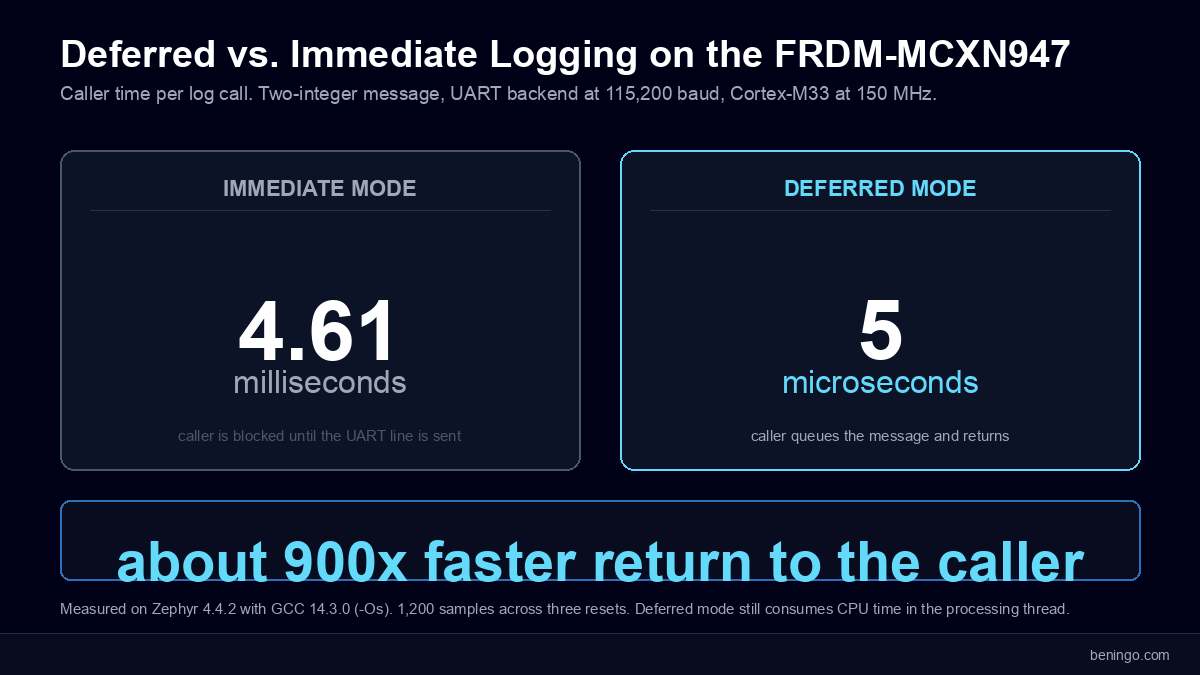
Once logging is working, it’s tempting to keep adding messages and assume deferred mode will take care of the overhead. I wanted to see how far that assumption holds on the FRDM-MCXN947. The comparison below uses a two-integer message with Zephyr 4.4.2, GCC 14.3.0, size optimization (-Os), and the Cortex-M33 at 150 MHz. Each caller-time result combines 1,200 samples across three resets; separate builds measured footprint without the timing instrumentation.
| Configuration | Caller median | Flash Δ | RAM Δ |
|---|---|---|---|
| Minimal UART1 | 2.00 ms | +1,560 B | 0 B |
| Immediate UART | 4.61 ms | +5,752 B | +80 B |
| Deferred UART | 5.01 µs | +8,416 B | +6,496 B |
| Deferred + runtime filtering2 | 6.39 µs | +9,440 B | +6,552 B |
| Deferred + LOG_SPEED | 4.85 µs | +9,864 B | +6,496 B |
CONFIG_LOG=n. 1 Minimal mode omits timestamps and the usual module prefix, producing shorter lines. 2 Accepted messages with runtime filtering enabled. Minimal mode uses printk-style output and fewer features.The biggest benefit was getting the application back to work sooner. With the polling UART at 115200 baud, an immediate call kept the caller busy for about 4.61 milliseconds. Deferred mode returned in about 5 microseconds. If that call sits inside a task with a tight deadline, the difference matters much more than how quickly the text appears on your terminal. That’s why I’d start with deferred mode for the normal application path.
However, that quick return can give you the wrong impression about the total cost. Sending 64 messages still consumed about 281 milliseconds of processing-thread CPU time. The polling backend was busy waiting on the UART; we had moved that burden away from the caller. We also paid for the separation in RAM: the deferred test reserved a 4096-byte message buffer and a 2048-byte processing-thread stack. Deferred mode helps protect the caller’s timing, but you still need to budget the output work and memory.
Filtering offered a more direct way to avoid unnecessary work. The excluded DEBUG call disappeared from the generated code, along with its unique format string. Runtime filtering kept that detail available for later use, with some additional flash, RAM, and checking overhead. I’d make that choice based on whether the device needs adjustable diagnostics in the field. LOG_SPEED was less compelling here: it saved only about 3% of caller time while adding 1,448 bytes of flash.
The backend tests showed why a bigger buffer isn’t always the next thing to try. At a requested 400 messages per second, deferred UART delivered about 39% of the messages across the full run and final drain. RTT, read through the onboard CMSIS-DAP probe using OpenOCD, delivered them all at that sustained rate. The application was producing more output than our UART configuration could carry. Extra RAM could hold messages for longer, but changing the transport addressed that constraint. Faster bursts still lost RTT output, so the reader and its buffering matter too.
What would I take from these tests into a product? Start with the messages you actually need, then check whether the caller can meet its deadlines and the backend can keep up. Use the table to understand the tradeoffs, rather than copy a configuration because it has the smallest number in one column.
Your Next Steps
At this point, you should understand how a message moves through the Zephyr logging subsystem, how to add logging to a module, and how your configuration affects the application. You’ve also seen why a logging call that returns quickly can still leave quite a bit of work for the processor!
Here are a few steps I’d recommend for going deeper:
- Add logging to one application module. Start with initialization, state changes, and error conditions. Include enough context to understand what happened without having to stop the processor.
- Experiment with per-module log levels. Enable DEBUG for the module you’re investigating while keeping the others quieter. Inspect the resolved configuration to verify that your settings did what you expected.
- Measure your own configuration. Use the example project as a starting point, then try messages and rates representative of your application. Check caller timing, memory use, and whether the output actually arrives.
The next time your application misbehaves, try capturing its behavior before reaching for a breakpoint. You might find that a few well-placed messages tell you more than an afternoon of single-stepping.
Additional Resources
- Download: Zephyr RTOS AI Skills
- Blog: Introduction to the NXP MCX N FRDM Board
- Blog: Getting Started with Zephyr RTOS
- Blog: How to Configure Zephyr RTOS: A Practical Guide to West, Kconfig, prj.conf
- Blog: FreeRTOS to Zephyr Migration: A Step-by-Step Guide for Embedded Developers
- Blog: Mastering the Zephyr RTOS Devicetree and Overlays
- Blog: Zephyr RTOS Sensor API: Unlock On-Board Temperature Sensing
- Blog: Zephyr RTOS: Porting Apps Across Different Boards
- Blog: Zephyr Custom Board: Create One in Under an Hour
- Blog: How to Write a Zephyr Devicetree with AI
- Blog: Tuning Zephyr Kconfig with AI: Stop Guessing at Build Options
- Blog: From AI-Assisted to Agentic Zephyr Development: Build, Flash, Fix
- Free Training: Getting Started with MCUXpresso for Visual Studio Code
- Free Webinar: Getting Started with the MCUXpresso SDK for NXP MCUs
- Free Webinar: Migrating from FreeRTOS to Zephyr RTOS
- Free Webinar: Mastering Zephyr Devicetree
Want embedded engineering insights like this delivered to your inbox? Sign up for my Embedded Bytes newsletter to get the latest posts, insights, and hands-on tips delivered straight to your inbox.
Frequently Asked Questions
What is the Zephyr logging subsystem?
The Zephyr logging subsystem records messages from application and driver modules, filters them by severity, and sends accepted messages to output backends. Module names, timestamps, and severity tags help developers follow execution and diagnose failures while the application runs.
How do I enable logging in a Zephyr application?
Enable CONFIG_LOG=y in prj.conf and select a backend, such as CONFIG_LOG_BACKEND_UART=y. Include <zephyr/logging/log.h> in the source file, register a module with LOG_MODULE_REGISTER, and add calls such as LOG_INF or LOG_ERR. For deferred processing, select CONFIG_LOG_MODE_DEFERRED=y. Verify that the selected output hardware and its driver are configured.
Is Zephyr logging configured through Kconfig or devicetree?
Kconfig enables the Zephyr logging subsystem and controls its modes, filtering, buffers, and backends. Devicetree describes hardware used by an output, such as a UART and its pin assignments. On the FRDM-MCXN947, the existing board configuration provides the UART console used in this example.
What are the Zephyr log severity levels?
Zephyr provides ERROR (1), WARNING (2), INFO (3), and DEBUG (4); level 0 disables normal module messages. A module threshold includes that level and more severe messages. An INFO threshold therefore includes errors, warnings, and informational messages while excluding debug messages, subject to global build settings.
How do I set a different log level for each module?
Pass the desired level as the second argument to LOG_MODULE_REGISTER, for example LOG_MODULE_REGISTER(app, LOG_LEVEL_INF). For build configuration control, generate a module-specific symbol using Kconfig.template.log_config and register the module with CONFIG_APP_LOG_LEVEL. A module spanning multiple files is registered once; other files use LOG_MODULE_DECLARE with the matching name and level.
What is the difference between deferred and immediate logging?
Deferred logging packages accepted messages into a RAM buffer so a processing context can format and output them later. Immediate logging performs formatting and backend output in the caller before the call returns. An immediate call from an interrupt handler therefore adds that output work to the handler. Deferred mode shortens the caller path but still consumes CPU time and memory.
Does runtime filtering remove debug messages from the firmware?
No. Runtime filtering changes which compiled-in messages are accepted while the application runs. The logging code and associated strings remain available in the image. Compile-time filtering can remove excluded calls and their logging-specific content. Runtime filtering cannot restore calls removed during compilation.
Which output backends can Zephyr logging use?
Zephyr provides backends including UART, RTT, SWO, filesystem, network/syslog, MQTT, Bluetooth LE, WebSocket, semihosting, and platform-specific outputs. Applications can also implement custom backends. Backend availability depends on the target, enabled dependencies, and Zephyr version. Multiple backends can be active, with additional processing and output costs.
Can Zephyr log messages be stored in RAM or a filesystem?
Yes. Deferred logging temporarily queues messages in RAM, but that queue is not a retained log history. A custom RAM backend can retain a bounded history for later retrieval. The filesystem backend, enabled with CONFIG_LOG_BACKEND_FS, writes to a configured and mounted filesystem. In the tested Zephyr 4.4.2 implementation, it does not support immediate mode and deactivates on entering panic mode.
Why does the Zephyr logging subsystem drop log messages?
Messages can be lost when generation exceeds processing or transport capacity. CONFIG_LOG_BUFFER_SIZE controls deferred queue capacity, and CONFIG_LOG_MODE_OVERFLOW selects whether older queued messages may be discarded to admit new ones. A larger buffer helps with bursts but cannot fix sustained overload. Backends can also lose output independently, so verify delivery at the destination.
How can I reduce logging overhead in a Zephyr application?
Remove unnecessary detail through per-module compile-time levels, use deferred mode when caller timing matters, and select a backend that can carry the required output rate. Rate-limit repeated events and measure stack, RAM, caller latency, and message delivery on the target. Deferred logging moves output work away from the caller; it does not make that work disappear.
Struggling to keep your development skills up to date or facing outdated processes that slow down your team, raise costs, and impact product quality?
Here are 4 ways I can help you:
- Embedded Software Academy: Enhance your skills, streamline your processes, and elevate your architecture. Join my academy for on-demand, hands-on workshops and cutting-edge development resources designed to transform your career and keep you ahead of the curve.
- Consulting Services: Get personalized, expert guidance to streamline your development processes, boost efficiency, and achieve your project goals faster. Partner with us to unlock your team's full potential and drive innovation, ensuring your projects success.
- Team Training and Development: Empower your team with the latest best practices in embedded software. Our expert-led training sessions will equip your team with the skills and knowledge to excel, innovate, and drive your projects to success.
- Customized Design Solutions: Get design and development assistance to enhance efficiency, ensure robust testing, and streamline your development pipeline, driving your projects success.
Take action today to upgrade your skills, optimize your team, and achieve success.