Tuning Zephyr Kconfig with AI: Stop Guessing at Build Options
One of the most powerful features of Zephyr RTOS is also one of the easiest to get wrong: Kconfig.
Kconfig is Zephyr’s build-time configuration system, and it is the layer where Zephyr Kconfig with AI either helps you or wastes your afternoon. It lets you select software features, enforce dependencies, and tailor an application without changing source code (see the official Zephyr Kconfig documentation for the underlying mechanics). The problem is that many embedded developers aren’t familiar with how it works.
So, they ask AI what to put in prj.conf.
Sometimes AI gets it right. Often, it gets it almost right. You add the recommended CONFIG_* option, build, get an error, paste it back into the chat, add another option, and try again. A simple Zephyr Kconfig with AI task turns into an iterative guessing game.
The problem is that we’re asking AI to recall Kconfig symbols from memory instead of making it inspect the Zephyr tree we’re actually building.
Kconfig is not a single configuration file. Zephyr defines configuration symbols across a hierarchy of Kconfig files. Board and SoC defaults, prj.conf, configuration fragments, dependencies, and defaults are resolved together to produce the application’s final configuration.
Knowing that CONFIG_SHELL=y exists is only the beginning. You still need to know whether it exists in your version of Zephyr, what it depends on, and what other options are required to make the feature work.
AI shouldn’t guess any of that. It should prove it.
That’s the idea behind grep-or-refuse: before AI recommends a Kconfig symbol, it must find it in the Zephyr source tree and verify its dependencies. If it can’t find evidence for the setting, it doesn’t invent one.
In this post, I’ll walk through that Zephyr Kconfig with AI workflow on the NXP FRDM-MCXN947 and show how to turn a plain-English goal into a verified Zephyr configuration instead of a prj.conf assembled through trial and error.
Free for Zephyr Developers
Get a Free NXP FRDM-MCXA156 Dev Board
NXP is offering 500 free FRDM-MCXA156 boards to embedded developers exploring Zephyr. Limited to 500 boards or available through December 31, 2026, whichever comes first.
Claim Your Free Board →Why Zephyr Kconfig with AI Guesses Go Wrong
Your prj.conf Is Not the Configuration
When developers first encounter Zephyr, it is easy to think of prj.conf as the configuration for the application. It isn’t. It is one input into Kconfig’s configuration process.
Zephyr combines board-specific configuration with application settings from prj.conf. Applications can also supply additional configuration fragments and CONFIG_* values through the build system. Kconfig resolves those inputs against the definitions, defaults, and dependencies in the Kconfig tree.
The final resolved configuration is written to:
build/zephyr/.configZephyr also generates autoconf.h, which exposes the resolved configuration to the source code being compiled.
Those generated files represent what Zephyr actually configured. Your prj.conf does not. It describes what your application is asking Kconfig to change. You can think of prj.conf as an application-specific Kconfig fragment that is merged with the other configuration inputs to produce the final configuration.
That distinction matters when you start using Zephyr Kconfig with AI. The model can generate a plausible prj.conf, but plausible is not the same as correct.
A Successful Build Doesn’t Mean Your prj.conf Is Right
Ask AI, “What do I need in prj.conf to enable a shell over UART?” and it might give you:
CONFIG_SHELL=y
CONFIG_SHELL_BACKEND_SERIAL=y
CONFIG_SERIAL=y
CONFIG_UART_CONSOLE=yThose are reasonable candidates. In fact, they are the same candidates we’ll encounter later when we use the kconfig-tuner skill to automate this Zephyr Kconfig with AI process.
But two questions remain:
- Does each symbol actually exist? A setting remembered from training data, an old example, or a different Zephyr version may not exist in the source tree you are building.
- Do you actually need to set it? The board
_defconfigmay already enable some of those settings. Other values may come from Kconfig defaults or dependencies. Adding every plausible option can give you a working build while leavingprj.conffull of settings your application never needed.
The safe approach is to verify every candidate against the actual Zephyr Kconfig tree and remove symbols already provided by the board configuration.
A successful build tells you Zephyr found a valid configuration. It does not tell you that every line AI added was necessary.
Fortunately, you can check that yourself. Before we automate the process with AI, let’s walk through how to find and validate Kconfig settings manually.
Stop Guessing: Find the Kconfig Symbols Yourself
If you already know the exact CONFIG_* symbol you need, finding its definition is easy. But what if you don’t?
Suppose your goal is simply: enable the Zephyr shell over UART. You may not know that CONFIG_SHELL or CONFIG_SHELL_BACKEND_SERIAL even exist. That is exactly the gap a good Zephyr Kconfig with AI workflow should close.
Start with the feature, not the configuration symbol. Search the Kconfig tree for terms related to what you are trying to enable:
grep -Rni --include="Kconfig*" "shell" $ZEPHYR_BASEThat search gives you somewhere to start. Once you encounter a promising symbol such as SHELL, find its actual definition:
grep -Rni --include="Kconfig*" "^config SHELL$" $ZEPHYR_BASEOnce you find SHELL, open the surrounding Kconfig instead of stopping at the symbol name. In Zephyr 4.4.1, subsys/shell/Kconfig starts with:
menuconfig SHELL
    bool "Shell"
    imply LOG_RUNTIME_FILTERING
    select EVENTS

if SHELL
source "subsys/shell/backends/Kconfig.backends"That tells us several things. SHELL is a real Kconfig symbol, enabling it selects EVENTS, and the shell configuration pulls in another Kconfig file containing its backends.
Open subsys/shell/backends/Kconfig.backends and the shell path becomes clearer:
menuconfig SHELL_BACKENDS
    bool "Shell backends"
    default y

config SHELL_BACKEND_SERIAL
    bool "Serial backend"
    default "$(dt_chosen_enabled,$(DT_CHOSEN_Z_SHELL_UART))"
    select SERIAL
select RING_BUFFERNow we have evidence instead of guesses. Shell backends default to enabled. The serial backend can default on based on the zephyr,shell-uart chosen devicetree node, and enabling it automatically selects both SERIAL and RING_BUFFER.
That is exactly the problem we’re trying to avoid. You might find an example online containing:
CONFIG_SHELL=y
CONFIG_SHELL_BACKEND_SERIAL=y
CONFIG_SERIAL=yBut the Zephyr 4.4.1 source tells us that SHELL_BACKEND_SERIAL already selects SERIAL. Adding CONFIG_SERIAL=y may be redundant!
This is why blindly copying a list of CONFIG_* options is the wrong approach. Follow the Kconfig definitions and let Zephyr tell you what each symbol enables, selects, depends on, or provides by default.
The source tree is the authority!
Automate Zephyr Kconfig with AI Using kconfig-tuner
We just found the shell configuration manually. It worked, but it required several searches through the Zephyr tree and some knowledge of how to interpret the results.
That is exactly the kind of repetitive and time-consuming work AI should handle.
I created a skill called kconfig-tuner that takes a plain-English goal and applies the same workflow automatically. It follows the skill standard, so it works with Claude Code, Codex, or any of your favorite AI tools. It is one of the Zephyr AI Skills in the same set as the devicetree-author skill I covered in How to Write a Zephyr Devicetree with AI.
Instead of asking AI:
What CONFIG options do I need for a shell?
We give it a process to follow:
Use the kconfig-tuner skill to enable a shell over UART in prj.conf.
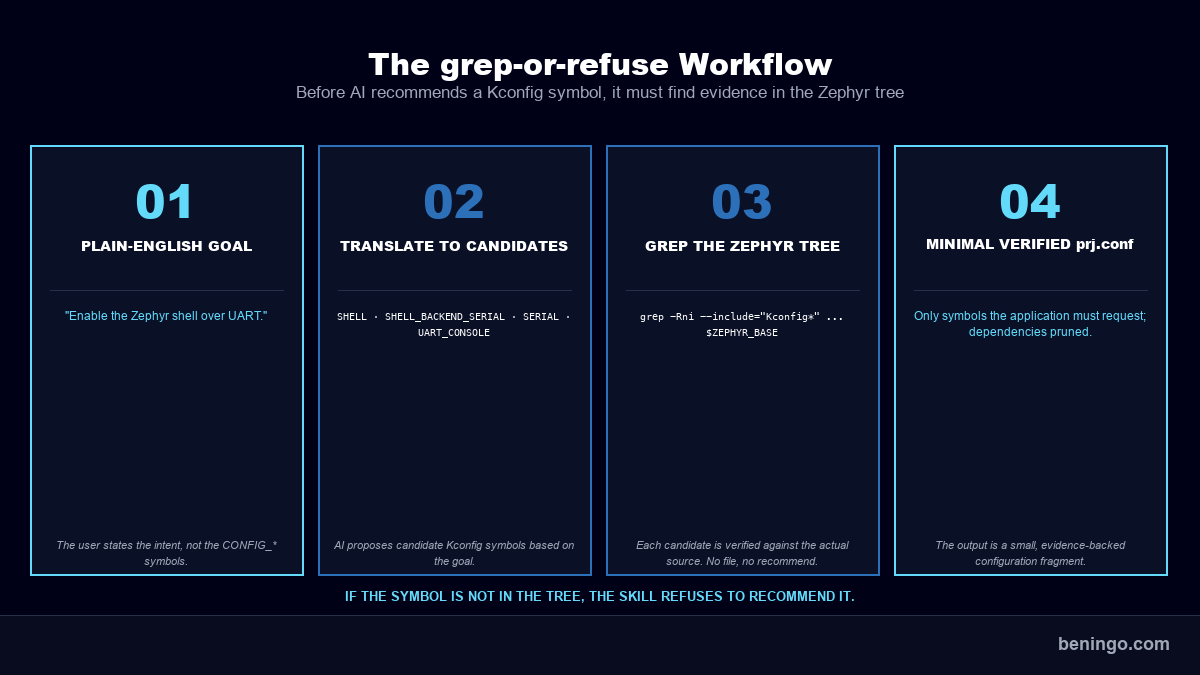
The skill first translates that goal into candidate Kconfig symbols. It then searches the Zephyr source tree to prove that each symbol exists before recommending it.
For our shell example, that means investigating candidates such as:
CONFIG_SHELL
CONFIG_SHELL_BACKEND_SERIAL
CONFIG_SERIAL
CONFIG_UART_CONSOLEBut finding a symbol is not enough. The skill also examines the Kconfig definitions and board configuration to determine which settings are actually required. If one symbol selects another, or the board already enables it, that setting does not need to clutter prj.conf.
Most importantly, the skill has a refusal rule: if it cannot verify a Kconfig symbol against the Zephyr tree, it cannot recommend it.
The output is not supposed to be the largest configuration that happens to build. The goal is a minimal, verified Kconfig fragment containing only the settings the application needs to request.
We haven’t made AI better at remembering Zephyr.
We’ve given it a deterministic process for finding the answer and validating the results. That is what makes Zephyr Kconfig with AI a workflow rather than a guessing game.
Free for Embedded Bytes Subscribers
Download the Zephyr AI Skills
Five self-validating skills that turn AI into a real Zephyr BSP teammate: devicetree-author, kconfig-tuner, build-doctor, and more. Cut BSP bring-up from days to minutes with prompts that cite the actual Zephyr bindings.
Get the Skills →What kconfig-tuner Does for Zephyr Kconfig with AI
Now let’s run the same shell example through kconfig-tuner on the FRDM-MCXN947.
In Claude Code, I gave it a plain-English goal:
Use the kconfig-tuner skill to enable the Zephyr shell over UART in prj.conf.
The skill started by identifying the Kconfig symbols that might be involved, then searched the Zephyr 4.4.1 source tree for each one. It found SHELL in subsys/shell/Kconfig and SHELL_BACKEND_SERIAL in subsys/shell/backends/Kconfig.backends.
More importantly, it followed what those definitions actually do.
The serial shell backend contains:
config SHELL_BACKEND_SERIAL
    bool "Serial backend"
    ...
    select SERIAL
select RING_BUFFERSo CONFIG_SERIAL=y does not need to be added just because the shell uses a UART. SHELL_BACKEND_SERIAL selects it for us.
The skill also checked the board and resolved configuration before deciding what needed to go into prj.conf. The result was a much smaller application-specific configuration:
CONFIG_SHELL=y
CONFIG_SHELL_BACKEND_SERIAL=yThe validation report tells us why:
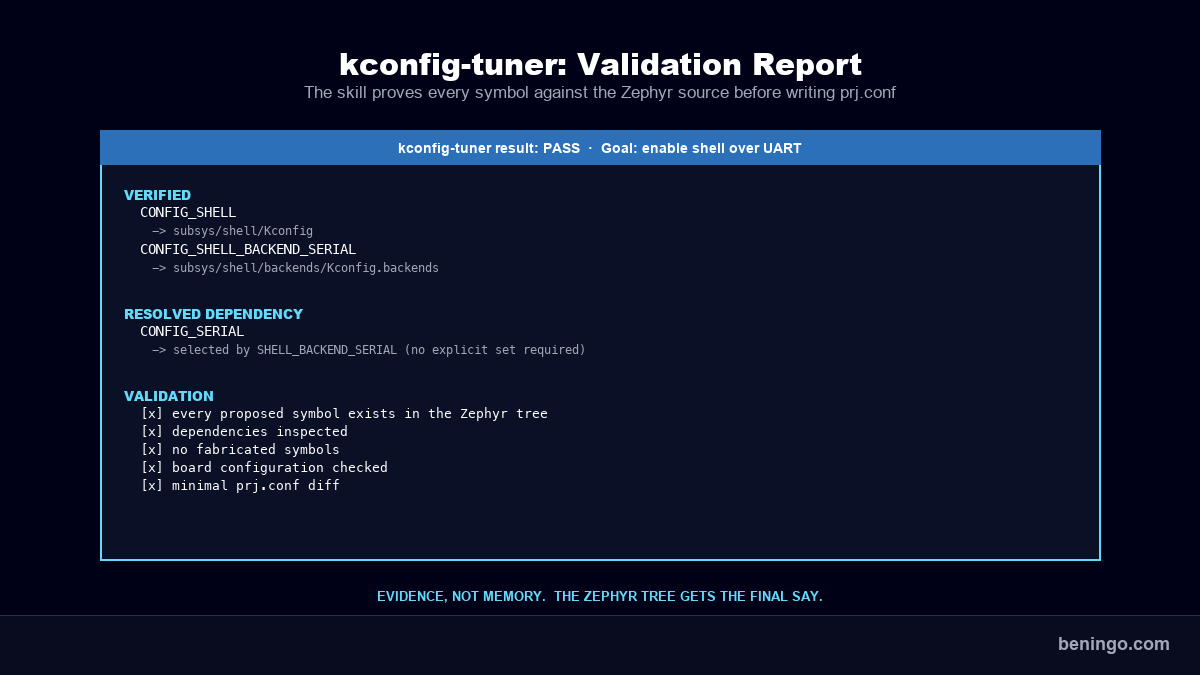
That is the behavior I want from AI. It can use its knowledge to figure out where to start, but it cannot use its memory as proof.
The Zephyr tree gets the final say.
Stop Asking AI to Know Kconfig
AI can be incredibly useful for configuring Zephyr, but only if we stop treating it like an encyclopedia of CONFIG_* options.
The model does not need to remember every Kconfig symbol. It needs a reliable process for finding them. That is the whole point of running Zephyr Kconfig with AI as a workflow rather than a lookup.
For me, that process comes down to three rules:
- Start with intent. Tell AI what you want the application to do, not which symbols you think it needs.
- Verify against the source. Every recommended
CONFIG_*symbol should be traceable to the Zephyr tree you are building. - Keep the diff minimal. Just because a symbol exists does not mean it belongs in
prj.conf.
You can follow that workflow manually with grep, and I recommend doing it a few times. Understanding how Zephyr’s Kconfig files connect makes debugging configuration problems much easier.
But once you understand the process, there is little reason to repeat it by hand.
That is why I built kconfig-tuner. The goal isn’t to make AI an expert on Zephyr Kconfig. The goal is to give AI a deterministic workflow that forces it to verify its work before touching your configuration.
The broader lesson applies well beyond Kconfig.
Don’t ask AI to be right. Give it a process that makes being wrong difficult. I’ve given you the example process and a set of example skills. Now take those skills, study them, modify them, or create new ones that help you work more efficiently with Zephyr and the FRDM-MCXN947 board. If you want the whole set, grab the Zephyr AI Skills package.
Additional Resources
- Download: Zephyr RTOS AI Skills
- Blog: Introduction to the NXP MCX N FRDM Board
- Blog: Getting Started with Zephyr RTOS
- Blog: How to Configure Zephyr RTOS: A Practical Guide to West, Kconfig, proj.conf
- Blog: FreeRTOS to Zephyr Migration: A Step-by-Step Guide for Embedded Developers
- Blog: Mastering the Zephyr RTOS Devicetree and Overlays
- Blog: Zephyr RTOS Sensor API: Unlock On-Board Temperature Sensing
- Blog: Zephyr RTOS: Porting Apps Across Different Boards
- Blog: Zephyr Custom Board: Create One in Under an Hour
- Blog: How to Write a Zephyr Devicetree with AI
- Free Training: Getting Started with MCUXpresso for Visual Studio Code
- Free Webinar: Getting Started with the MCUXpresso SDK for NXP MCUs
Frequently Asked Questions
What is Zephyr Kconfig?
Zephyr Kconfig is the build-time configuration system Zephyr inherits from the Linux kernel. It lets you enable or disable software features, set default values, and enforce dependencies through CONFIG_* symbols. The final configuration for your build comes from a hierarchy of Kconfig files, board and SoC defaults, and application inputs like prj.conf, resolved together at build time.
What is prj.conf in Zephyr, and does it fully define my configuration?
No. prj.conf is an application-specific Kconfig fragment, not the final configuration. Zephyr merges it with board defaults, SoC defaults, other configuration fragments, and Kconfig defaults to produce the resolved configuration written to build/zephyr/.config. Adding a symbol to prj.conf tells Kconfig what to change from those defaults, not what the application ends up with.
Can AI write a correct prj.conf for Zephyr?
Yes, but only if it verifies its work against the Zephyr source tree instead of recalling CONFIG_* symbols from memory. Ask AI to prove that each symbol exists in your Zephyr version, inspect what it depends on and selects, and check whether the board already enables it. Anything else is a guess dressed up as a recommendation.
What is the grep-or-refuse rule for Zephyr Kconfig with AI?
grep-or-refuse is a workflow rule that requires AI to find every recommended CONFIG_* symbol in the actual Zephyr source tree before proposing it. If the symbol is not there, the skill refuses to recommend it. This eliminates fabricated symbols and outdated examples pulled from training data, and is the core discipline behind Zephyr Kconfig with AI done well.
How do I find a CONFIG_* symbol I do not know the name of?
Start with the feature you want to enable, not the symbol. Grep the Zephyr tree for related terms with grep -Rni --include="Kconfig*" "<feature>" $ZEPHYR_BASE. Once you find a candidate, search for its definition with grep -Rni --include="Kconfig*" "^config <SYMBOL>$" $ZEPHYR_BASE and read the surrounding Kconfig file to see what it selects, depends on, and defaults to.
Why is my prj.conf full of CONFIG_* settings my application does not need?
A build that succeeds only tells you Zephyr found a valid configuration, not that every line was necessary. Board defconfigs, Kconfig defaults, and select/imply statements often provide symbols automatically. If SHELL_BACKEND_SERIAL selects SERIAL, adding CONFIG_SERIAL=y to prj.conf is redundant. A minimal, verified fragment only lists the symbols the application must request.
What is the kconfig-tuner AI skill?
kconfig-tuner is a portable AI skill that takes a plain-English goal (“enable shell over UART”) and produces a minimal, verified prj.conf fragment. It searches the Zephyr source tree to prove each recommended symbol exists, inspects its dependencies, checks the board default configuration, and refuses to recommend anything it cannot verify. It works with Claude Code, Codex, or any AI tool that supports the skill standard.
Want embedded engineering insights like this delivered to your inbox? Sign up for my Embedded Bytes newsletter to get the latest posts, insights, and hands-on tips delivered straight to your inbox.
Struggling to keep your development skills up to date or facing outdated processes that slow down your team, raise costs, and impact product quality?
Here are 4 ways I can help you:
- Embedded Software Academy: Enhance your skills, streamline your processes, and elevate your architecture. Join my academy for on-demand, hands-on workshops and cutting-edge development resources designed to transform your career and keep you ahead of the curve.
- Consulting Services: Get personalized, expert guidance to streamline your development processes, boost efficiency, and achieve your project goals faster. Partner with us to unlock your team's full potential and drive innovation, ensuring your projects success.
- Team Training and Development: Empower your team with the latest best practices in embedded software. Our expert-led training sessions will equip your team with the skills and knowledge to excel, innovate, and drive your projects to success.
- Customized Design Solutions: Get design and development assistance to enhance efficiency, ensure robust testing, and streamline your development pipeline, driving your projects success.
Take action today to upgrade your skills, optimize your team, and achieve success.